The best Divi restaurant layouts depend on how much setup you want to do. If you need a site live this week, start with the free layout packs built into the Divi Builder, such as Bistro and Restaurant. If you want a complete build with a reusable license, a paid child theme like the Divi Restaurant Theme from Divi Hat is the faster route. If the menu is your hardest page, add a dedicated menu module to either one.
Most restaurant owners and freelancers hit the same wall. A generic business layout has no menu, no hours block, and no booking path, so you end up rebuilding half of it. Search results mix free packs, paid themes, and plugins, and almost none of them tell you what is missing. Divi Hat has built websites with Divi for 10 years, so we judge a layout the way a builder does: which pages come in the box, what you still have to add, and what the license allows.
Below are seven options with page counts, prices, and honest limits. After them you get a side-by-side table, a checklist of what every restaurant site needs, and the exact steps to load a layout into your site.
1. Divi Restaurant Theme from Divi Hat
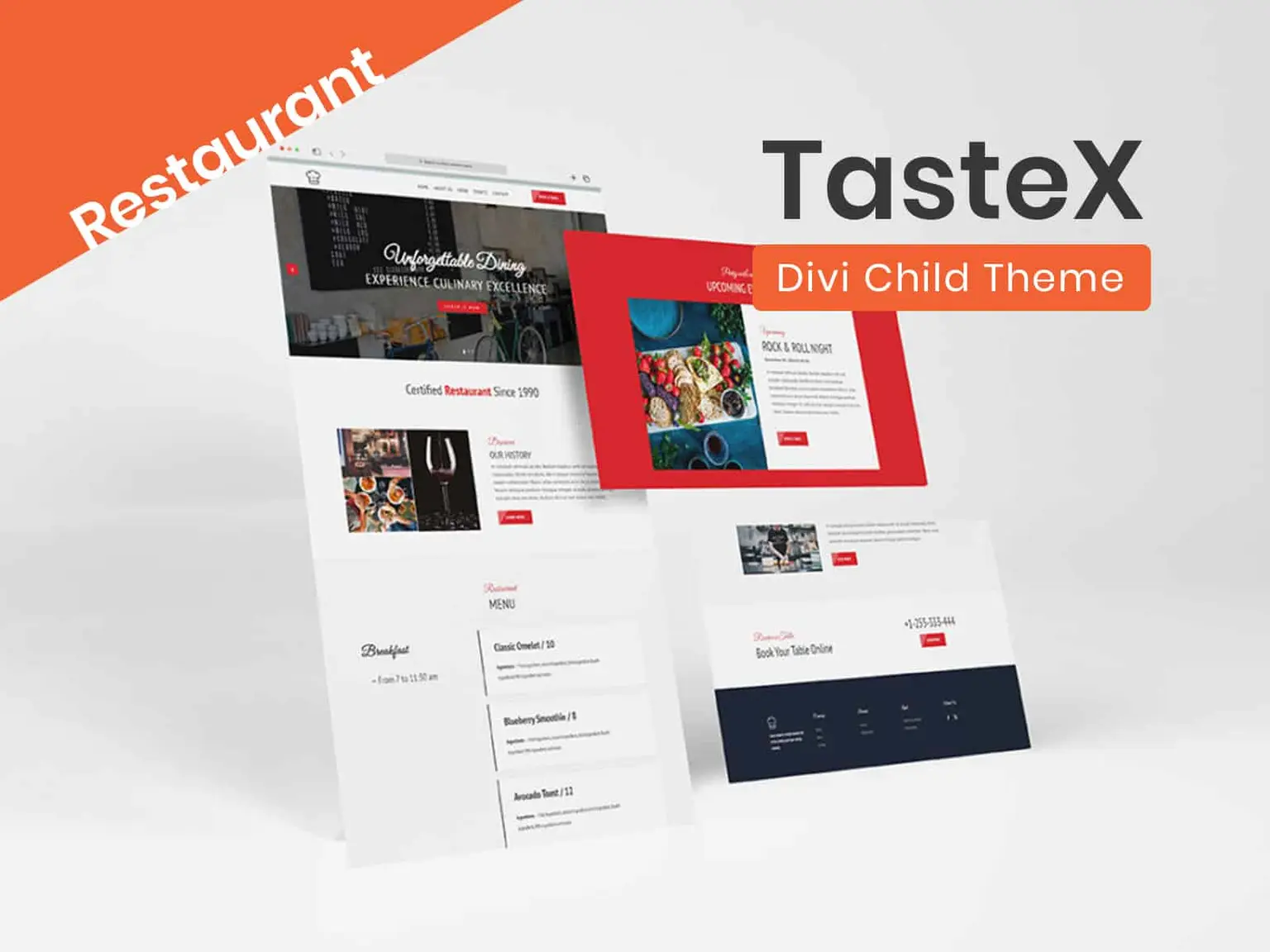
The Divi Restaurant Theme is a paid child theme for restaurants, cafes, and bistros that costs $39.99 and works on unlimited websites. It is our own product, so we put it first and we also tell you where it stops.
What it includes
The theme presents your menu, atmosphere, and services in a design you edit with the Divi Builder, so there is no second tool to learn. It is built for showing a restaurant, not for selling food online. It comes without WooCommerce or online payments, which keeps the site light and simple.
A restaurant child theme should sell your atmosphere and your menu, and leave the checkout to a tool built for it.
- Built for restaurants, cafes, and bistros
- Menu, atmosphere, and services presented in one design
- No WooCommerce or online payment setup
- Royalty-free images included, as with all Divi Hat products
- Priority support by chat or email
Fit and price
This theme suits owners who want a finished site without designing pages one by one. It also suits freelancers who build several restaurant sites a year. Unlimited website usage means one purchase covers every client site, and the 30-day money-back guarantee lets you test it on a staging copy first.
It does not suit a restaurant that must take card payments on its own site. If that is you, link out to your ordering platform from the menu page or pair another layout with a store plugin. For a dine-in spot, a cafe, or a bistro that takes calls and walk-ins, the missing checkout rarely matters.
2. Divi Bistro layout pack
Divi Bistro is a free layout pack built into the Divi Builder by Elegant Themes, with seven page templates. It is the quickest way to get a real menu page onto a free layout.
What it includes
Bistro loads from the premade layouts library, so you import nothing by hand. The pack uses royalty-free stock images, which saves you a licensing check on day one.
- Landing, Home, About, Blog, Contact, Menu, and Gallery pages
- Loads straight from the premade layouts inside the builder
- Free for personal and commercial use
Bistro covers the two pages diners open first, the menu and the gallery, at no cost.
Fit and price
Bistro suits a single restaurant on a tight budget. It also suits a freelancer who needs a clickable mockup for a client by the afternoon. The design is image-led, so it works best when you have good food photos to swap in for the stock ones.
The trade-off is that there is no reservations page. Plan to add a booking plugin or link to your reservation service from the home page button. The price is $0, and you can use it on client sites.
3. Divi Restaurant layout pack
The Divi Restaurant layout pack is a free pack from Elegant Themes with eight page templates, and it has no dedicated menu page. That gap is the first thing to plan around.
What it includes
The pack covers the pages a typical restaurant needs to get online fast, with hours of operation placed in the footer of every page. The hero section has a reservation button, but the button needs a booking plugin of your own before it does anything.
- Landing, Home, About, Blog, Contact, Shop, Team, and Gallery pages
- Hours of operation in the footer across the site
- Shop and blog pages that stay empty until you add products and posts
- Royalty-free stock images
The Restaurant pack gives you eight pages and no menu, so build the menu page before anything else.
Fit and price
This pack suits a restaurant that also sells merchandise or gift cards, since the Shop page is already designed. It also suits a team-focused venue, because of the Team page. The simple fix for the missing menu is to load the Menu page from the Bistro pack onto a new page. Divi loads layouts per page, so mixing packs works.
The pack is free for personal and commercial use. Expect to restyle fonts and colors module by module, because most styling is set on each element rather than globally.
4. Vegan, seafood, and poke layout packs
Elegant Themes also publishes free packs for specific cuisines: Vegan, Seafood, and Poke. Pick one when the cuisine shapes your copy and imagery, because the placeholder text and photos already fit.
What it includes
All three are built into the Divi Builder and use royalty-free stock images. Each has a menu page, and the Seafood pack adds a reservations page.
- Vegan: six pages (Landing, Home, About, Blog, Contact, Menu), aimed at vegan, vegetarian, and halal restaurants
- Seafood: seven pages (Landing, Home, About, Blog, Contact, Reservations, Menu), aimed at seafood, sushi, and lobster restaurants
- Poke: six pages (Landing, Home, About, Blog, Contact, Menu), aimed at poke and acai bowl shops
If the cuisine already matches the pack, you rewrite less copy and replace fewer photos.
Fit and price
These packs suit niche food businesses that want a focused look instead of a general restaurant style. The Seafood pack is the strongest of the three for dine-in venues because it includes a reservations page out of the box. You still connect that page to a real booking tool.
All three are free for personal and commercial use. A small cafe or food stall with a short menu can launch on any of them in an afternoon, and a freelancer can reuse the same pack across several similar clients.
5. Divi Pizza child theme
Divi Pizza is a paid child theme for pizzerias from PeeAye Creative, sold on the Elegant Themes marketplace. It leans toward ordering and catering, which general restaurant packs skip.
What it includes
The theme has five main page templates and a long list of restaurant-specific sections. The tabbed menu and the featured menu items are the parts most pizzerias use first.
- Home, Menu, Events & Catering, About Us, and Order Now pages
- Tabbed menu and featured menu items
- Testimonials, team members, and email opt-in sections
- Embedded Google Map and a contact form
- One-click demo installation and documentation
The Order Now and Catering pages are what separate a pizza theme from a general restaurant layout.
Fit and price
Divi Pizza suits pizza shops and takeout-heavy restaurants that want a clear path to ordering and catering inquiries. It is less useful for a fine-dining room that wants a reservations-first layout.
The marketplace lists it at $45 for a single site and $95 for unlimited sites, with support and updates for six months from the purchase date. Prices change, so confirm on the listing before you buy. Freelancers should compare the license tiers, because three client sites on single licenses cost more than one unlimited license.
6. Zara child theme
Zara is a paid all-in-one child theme for cafes and restaurants from B3 Multimedia, with nine page layouts. It is the most feature-rich of the paid third-party options here.
What it includes
Zara is mobile optimized and ships with a reservation form, which the free packs lack. A slider plugin is bundled, and two blog layouts let you choose between a full-width grid and a list with a sidebar.
- Nine unique page layouts
- Reservation form
- Master Slider plugin included for slider sections
- Two blog layouts
- One-click demo import
Zara is the pick when you want a booking form and a blog already designed in one purchase.
Fit and price
Zara suits cafes and mid-size restaurants that publish news, events, or specials on a blog and want reservations handled on the page. It is heavier than a free pack, so expect more to review before you launch.
The listing shows €55 for a standard single-site license and €150 for an extended unlimited license, with six months of support. The theme keeps working after support ends. The developer does not cover conflicts caused by later Divi, WordPress, or plugin updates, so keep a staging copy before you update.
7. Menu module layout packs and plugins
Menu add-ons solve one problem: a clean, filterable menu. They sit on top of any layout above, which makes them the most flexible item on this list.
What it includes
Two options stand out. The Divi Restaurant Menu Module Layout Pack gives you 16 menu layouts built for the Restaurant Menu Module from Divi Modules Pro, so you need that module as well. Divi Restro Menu is a plugin that adds a menu module with a different feature set.
- Divi Restaurant Menu Module Layout Pack: 16 menu layouts for the Divi Modules Pro module
- Divi Restro Menu: four dish layouts, a category filter bar, prices with size labels, ingredients, and a post type for dishes
Use a menu module when your menu has more than a dozen dishes or changes often.
Fit and price
These add-ons suit restaurants with long or seasonal menus, where editing dishes inside a page builder gets tedious. A post type lets staff update a dish and its price without touching the page design.
Pricing varies by seller, so check each listing. If your menu is short, skip the add-on. In Divi 5, nested rows and module groups also let you build reusable menu cards without a plugin, which costs nothing and adds no extra code to maintain.
How to choose and load a restaurant layout
Choose the layout that already covers your hardest page, which is usually the menu, then fill the gaps with pages from other packs. Setup is the same for every option: load, replace content, connect booking.
Side-by-side comparison
The table puts the main facts together so you can narrow the list in a minute.
| Option | Type | What is in the box | Price |
|---|---|---|---|
| Divi Restaurant Theme | Child theme | Menu, atmosphere, services, no WooCommerce | $39.99, unlimited sites |
| Divi Bistro | Built-in pack | 7 pages with menu and gallery | Free |
| Divi Restaurant | Built-in pack | 8 pages, no menu page | Free |
| Vegan, Seafood, Poke | Built-in packs | 6 to 7 pages with menus | Free |
| Divi Pizza | Child theme | 5 pages, tabbed menu, ordering | $45 single, $95 unlimited |
| Zara | Child theme | 9 layouts, reservation form | €55 single, €150 extended |
| Menu add-ons | Pack or plugin | 16 menu layouts or 4 dish layouts | Varies by seller |
Licensing changes the math for agencies. Three pizza client sites on Divi Pizza single licenses cost 3 × $45 = $135, while one unlimited license costs $95. The Divi Restaurant Theme at $39.99 covers all three, because it allows unlimited websites.
What every restaurant layout needs
Whatever you pick, check it against this list before you commit. Diners come to a restaurant site for a few answers, and hiding them costs you bookings. Most visitors arrive on a phone, so test each item there first.
- A menu that is easy to find and read on mobile
- Opening hours visible on every page
- A booking path: a form, a plugin, or a link to your reservation service
- A click-to-call button and a map that opens in Google Maps
- Real photos of the food and the room
- Reviews from sites your customers already use
How to load a layout in Divi
Built-in packs load in a few clicks. Open the page in the Visual Builder, open the settings bar, click the plus icon, choose Premade layouts, pick the pack and page, then click Use This Layout. Paid child themes and downloaded packs come as files, and their instructions vary.
For JSON layout files, go to Divi > Divi Library > Import & Export in your WordPress admin and import the file. Then open a page in the builder and use Load From Library. If the import fails with a file upload message, ask your host to raise the upload_max_filesize and post_max_size values. Test any older third-party pack on a staging copy first, since it may predate Divi 5.
Load the layout on a staging site first, replace the stock photos, then connect booking before you go live.
If you would rather skip setup, Divi Hat also offers a Divi Layout Installation service. You provide the Divi license and your WordPress or hosting credentials.
Pick one layout and test it this week
For a quick, free launch, start with Bistro or Seafood. For a finished restaurant site you can reuse across clients, choose a child theme. For a long menu, add a menu module. Whichever you choose, load it on a staging copy, swap in your own photos, and connect booking before you publish.
If you want a restaurant design that is ready to edit, browse Divi Hat’s Divi child themes and try the Divi Restaurant Theme with the 30-day money-back guarantee behind you.