Building a Divi site from scratch eats hours you don’t have, especially when a client wants a polished homepage by Friday. That’s why so many WordPress professionals turn to a divi marketplace instead of designing every section from a blank page. These marketplaces bundle premium layouts, hero sections, child themes, and plugins built specifically for Divi’s drag-and-drop framework, so you can assemble a site in an afternoon instead of a week.
If you’re wondering what’s actually for sale in a Divi marketplace and how to tell a good one from a mediocre one, this article breaks it down. You’ll see the difference between one-off layout purchases and membership access, what kinds of assets typically show up (hero sliders, ready-made wireframes, full child themes), and what licensing terms matter most for freelancers and agencies working on client sites.
We’ll also cover what separates a trustworthy marketplace from a risky purchase, things like usage rights, update frequency, and support quality. By the end, you’ll know exactly what to look for before you buy, and how a well-stocked library can cut your build time without cutting corners on design.
Why the Divi Marketplace matters for your website
A blank Divi Builder canvas looks simple until you’re staring at it at 11 p.m. trying to finish a homepage for a client meeting the next morning. This is the real reason a divi marketplace exists: it turns a multi-day design process into a few hours of customization, the same way you can build a Divi website in 24 hours with pre-made layouts. Instead of building header animations, pricing tables, and testimonial sliders from zero, you start from a professional foundation and adjust colors, fonts, and copy to match the brand in front of you. For freelancers juggling five projects at once, that difference isn’t a convenience, it’s the thing that keeps your business profitable.
Cutting build time without cutting corners
Speed only matters if the end result still looks custom, and this is where a well-curated marketplace earns its keep. Good professionally designed Divi 5 layouts are built by designers who understand Divi’s module system inside and out, so the spacing, mobile breakpoints, and hover effects already work before you touch a single setting. You’re not stitching together mismatched sections from five different free downloads and hoping they play nice together.
A good Divi marketplace doesn’t just save you hours, it protects the polish clients are paying for.
The time savings add up fast once you compare the two approaches side by side, and they stack on top of the usual time-saving tips for Divi web designers:
| Task | Building from scratch | Using a marketplace layout |
|---|---|---|
| Hero section design | 3-5 hours | 20-30 minutes |
| Full homepage (6-8 sections) | 2-3 days | Half a day |
| Mobile responsiveness fixes | 1-2 hours per section | Usually pre-tested |
| Matching brand colors/fonts | Manual, section by section | Global style swap |
Consistency across every client project
Running a design business means your work has to look reliably good, not just occasionally brilliant when you have extra time. A membership library gives you a consistent toolkit you return to project after project, so your output quality doesn’t dip when a deadline gets tight. It also means you’re not reinventing your workflow every time you start a new site; you already know how a given layout behaves, how it collapses on tablets, and where the customizable text fields sit. That familiarity compounds over dozens of client sites into a genuine competitive edge.
Quality control beats endless searching
Searching the open web for free Divi layouts wastes more time than it saves, which is the core of the free vs. paid Divi layouts argument. You’ll find outdated modules built for old Divi versions, broken shortcodes, or designs bundled with stock images you have no legal right to use commercially. A curated Divi theme marketplace solves this by vetting every asset before it goes up for sale, so you’re not gambling on compatibility every time you import a layout pack. This matters even more now that Divi 5 has changed how certain builder features work under the hood; layouts sold on a marketplace that actively maintains its library get updated to match, while random downloads from a forum thread five years old almost never do.
Licensing terms that protect your freelance business\n
Buying design assets without reading the license is one of the most common mistakes new freelancers make, and it can bite you hard when a client project scales beyond what you assumed you were allowed to do. Serious marketplaces spell out exactly what you can do with a purchase, and you want to check for these terms before you check out:
- Unlimited site usage, so you can reuse the same layout across multiple client builds without buying it again
- Client project rights, confirming you can install and resell the design as part of paid work
- Royalty-free images, so the photography bundled with a layout won’t trigger a licensing claim later
- Update access, meaning you keep receiving fixes as Divi itself evolves
Getting this wrong doesn’t just cost you money, it can put an entire client relationship at risk if a licensing dispute surfaces after launch. Reading the fine print once, before you buy, is far cheaper than untangling it after a site is live.
How to buy and install Divi Marketplace products
Getting a layout from a marketplace onto a live site is simpler than most beginners expect, but the order of operations matters. You pick your access method, download the files, then import them through the Divi Builder itself rather than a generic WordPress plugin installer. Skip a step and you’ll end up with a layout that looks broken or missing images, which is usually a support ticket that could have been avoided.
Choosing between one-off purchases and membership access
Most Divi marketplaces, including DiviHat, give you two paths in: buy a single layout pack for a specific project, or join a membership that unlocks the entire library. A one-off purchase makes sense if you need exactly one hero section for a one-time client site. But if you’re building websites regularly, membership pricing almost always wins on cost per asset, and it saves you from re-purchasing every time a new project needs a different style.
If you build more than two or three sites a year, membership access pays for itself faster than buying layouts one at a time.
Installing your first layout or child theme
Once you’ve bought access, the actual installation follows a predictable pattern across most Divi resources. Here’s the general flow:
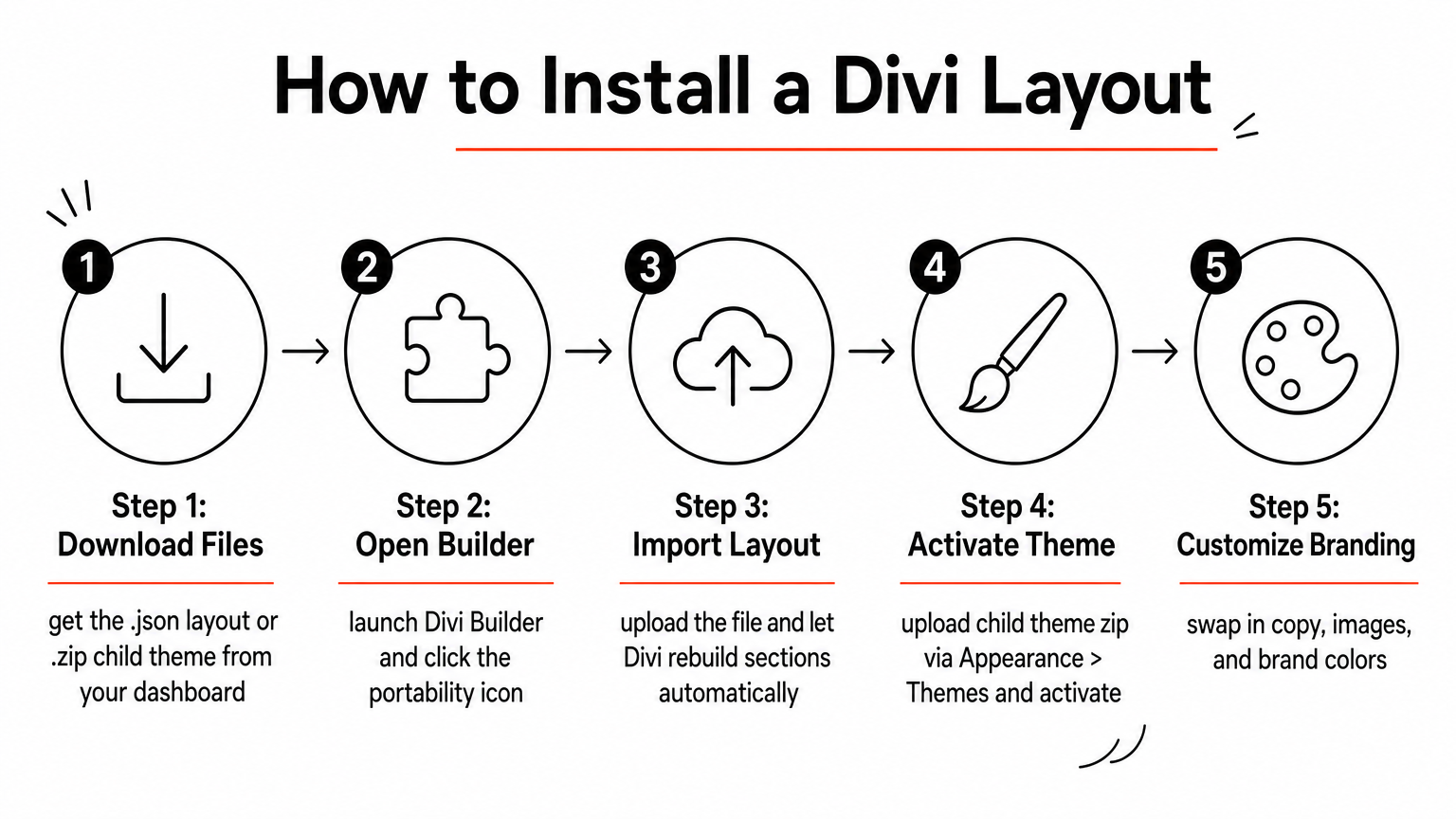
- Download the layout .json file or child theme .zip from your account dashboard.
- For layouts, open the Divi Builder on the page you want to use, click the portability icon (the small icon in the top toolbar), and choose Import, as shown in the full Divi layout installation guide.
- Upload the .json file and let Divi rebuild the sections, rows, and modules automatically.
- For a child theme, go to Appearance > Themes > Add New > Upload Theme in your WordPress dashboard, upload the .zip, and activate it, following the Divi child theme installation steps.
- Swap in your own copy, images, and brand colors using Divi’s global color and font settings so the layout stops looking like a template.
That last step is the one people skip, and it’s the difference between a site that looks recycled and one that looks custom-built for the client.
Keeping assets updated after launch
After the site goes live, don’t treat the layout as a finished, untouchable file. Divi itself updates regularly, and Divi 5’s structural changes in particular affect how older layouts render if they haven’t been refreshed by the marketplace. Check your account dashboard periodically for updated versions of layouts you’ve already purchased, especially ones tied to hero sliders or interactive modules, since those tend to break first when the builder changes underlying code. Marketplaces that push regular updates to their library, rather than uploading once and walking away, are the ones worth trusting with your production sites. A quick five-minute check before a client’s site goes live can save you an emergency fix a month later when something quietly stops working.
What you can buy: layouts, themes, and plugins
A well-stocked divi marketplace sells more than one category of asset, and knowing the differences helps you buy exactly what a project needs instead of overpaying for a bundle you’ll never fully use. Most libraries split their catalog into three buckets: pre-built layouts for individual pages, child themes for full-site design, and plugins that add functionality Divi doesn’t include out of the box. DiviHat, for example, organizes its library this way, with over 100 assets spanning all three categories under one membership.
Pre-built layouts and hero sections
Layouts are the most common purchase, and for good reason. They’re the fastest way to fill a page with a professional design without touching a blank canvas. A typical layout pack includes a homepage, an about page, a services page, and a contact page, all styled consistently and ready to drop into the Divi Builder. Hero sections deserve a separate mention because they’re often sold on their own; a single ready-made hero section for Divi 5 can transform a site’s first impression without requiring a full redesign, which makes it a popular add-on when a client just wants a fresher header.

The right hero section does more design work in five seconds of load time than any amount of copywriting below the fold.
Child themes for full-site design
While layouts handle individual pages, a child theme governs the look and feel of an entire site, including typography, spacing, and global color rules that carry across every page you build. Buying a child theme makes sense when a client wants a distinct visual identity rather than a patchwork of separate layouts styled to match after the fact. Good marketplaces sell ready-made Divi child themes built on top of the core Divi theme, meaning you still get all of Divi’s builder functionality, just wrapped in a more defined design system from the start.
Plugins and functional add-ons
Beyond visuals, some marketplaces also sell plugins that extend what Divi can do functionally, things like advanced form builders, popup modules, or WooCommerce styling extensions. These matter most when a client needs a feature Divi’s native modules don’t cover well, like a booking calendar or a membership gate. Not every Divi marketplace stocks plugins, so if functionality is your main gap, check the catalog before assuming layouts alone will solve the problem.
Matching the asset to the job
Deciding what to buy comes down to matching the asset type to the actual scope of the project in front of you, so it helps to understand when a layout beats a child theme:
| You need | Best asset type |
|---|---|
| One fresh page for an existing site | Single layout |
| A whole new site with consistent branding | Child theme |
| A stronger first impression on the homepage | Hero section slider |
| Missing functionality (forms, bookings, popups) | Plugin |
Getting this match right the first time saves you from buying a full child theme when a single hero section would have solved the client’s actual complaint.
Pricing, licensing, and support on the marketplace
Price is usually the first thing people compare between marketplaces, but it’s the least useful number on its own. What matters more is what that price actually unlocks: one layout, a whole library, or a year of updates that keep pace with Divi’s own changes. Before you pull out a card, look past the sticker price and check what happens after the sale, because that’s where cheap marketplaces start costing you more than the premium ones.
Membership pricing vs one-time purchases
Most Divi marketplaces price things two ways: a flat fee for a single layout pack, or a recurring membership fee that unlocks everything in the catalog. A single hero section might run you $15 to $30, while full membership access typically lands in the range of a few hundred dollars a year, sometimes less if you catch one of the Divi discounts worth knowing about. The math tips toward membership fast once you’re buying more than five or six individual assets annually, since you stop paying per download and start paying once for unlimited access.
| Access type | Typical cost | Best for |
|---|---|---|
| Single layout or hero section | $15-$40 | One project, tight budget |
| Annual membership | $150-$300 | Freelancers building 3+ sites/year |
| Lifetime membership (where offered) | One-time, higher upfront | Agencies with ongoing client work |
Licensing terms you should confirm before checkout
Regardless of price, the license attached to a purchase determines whether you can actually use it the way you plan to. Confirm these before checkout, not after:
- Number of sites the license covers (single-site vs unlimited)
- Client project rights, since some cheaper licenses restrict resale use
- Image licensing, so bundled photography is cleared for commercial use
- Update duration, since some memberships only include updates while active
A low price with a restrictive license usually costs more than a fair price with unlimited rights.
DiviHat’s membership covers unlimited site usage and client project rights as standard, which removes the guesswork freelancers otherwise face reading fine print on every individual purchase.
Support and guarantees that protect your purchase
Support quality separates marketplaces you can build a business around from ones you’ll regret trusting with a client deadline. Ask how you reach support (chat, email, or both), how fast they typically respond, and whether they help troubleshoot import issues or just point you to a documentation page. Priority support via chat matters more than it sounds once a layout breaks the night before a launch and you need an actual answer, not a ticket queue or a generic page on troubleshooting common Divi problems.
Question whether refunds exist at all before you commit real money to a membership you haven’t tested. A 30-day money-back guarantee signals a marketplace confident enough in its own catalog to let you try it risk-free, and it’s worth treating as a baseline expectation rather than a bonus. Reviews and purchase counts help here too; a marketplace with thousands of completed sales and consistent five-star feedback has already survived the scrutiny of freelancers who had just as much riding on their client deadlines as you do.
Divi Marketplace alternatives worth exploring
No single marketplace fits every project, and it’s worth knowing what else is out there before you commit to one library long-term. Some freelancers mix sources depending on the job, pulling a hero section from one place and a full child theme from another. Understanding the alternatives also helps you judge whether a marketplace like DiviHat’s pricing and licensing actually stack up well, or whether you’re paying for convenience you could get elsewhere for less.
Divi’s built-in layout library
Divi itself ships with a built-in layout pack accessible right inside the builder, and it’s worth using for quick internal pages or placeholder content. The built-in layouts cover common page types like about pages and contact forms, but the catalog is smaller and less frequently refreshed than a dedicated third-party marketplace. You also won’t find specialty assets here, things like animated hero sliders or niche-specific child themes built for real estate, restaurants, or agencies. Treat it as a starting point rather than a full replacement for a curated library.
Freelance designers and fully custom builds
Hiring a designer to build layouts from scratch is the other end of the spectrum, and it solves a different problem than a marketplace does. Custom work makes sense when a client needs something genuinely unique that no template library will ever stock, brand-specific animations or an unusual page structure, for example. But custom design work costs significantly more per page than a marketplace layout, and turnaround time is measured in days or weeks, not minutes. For most client sites, where the goal is a polished, professional result on a deadline, this route only makes sense for the handful of pages that truly need to be one-of-a-kind.
Custom design solves for uniqueness, a marketplace solves for speed. Most projects need speed more often than they need uniqueness.
General WordPress marketplaces
Broader WordPress marketplaces sell themes and page builder assets across many platforms, not just Divi, and that breadth comes with a tradeoff, which is part of why Divi compares well against Elementor. Assets there are rarely built specifically for Divi’s module system, so importing them often means more manual cleanup than a layout designed for Divi from the start. Compatibility issues also crop up more often, since a generic marketplace has no obligation to update files when Divi itself changes.
Weighing the tradeoffs
Here’s a quick way to think through which route fits a given project:
- Speed matters most, budget is tight: a dedicated Divi marketplace wins almost every time.
- The design must be completely unique: hire a designer for that specific page or section.
- You’re comparing across multiple builders, not just Divi: a general marketplace might be worth browsing, but expect extra setup work.
- You’re building Divi sites regularly: a membership-based library built specifically for Divi will save more time than any of the alternatives above, since compatibility and updates are already handled for you.
Finding the right Divi resources for you
A good divi marketplace turns a stressful deadline into a manageable afternoon of customization. You now know how to tell a curated library from a risky download: check the licensing, confirm update frequency, and read the refund policy before you buy anything. Whether you need a single hero section or a full library of child themes and layouts, matching the asset to the actual scope of the project saves you money and time you’d otherwise waste rebuilding sections from scratch.
Giving your workflow a reliable set of tools pays off on every future project, not just the one due tomorrow. Skip the scattered free downloads and inconsistent quality, and build from a library that’s maintained, licensed for client work, and backed by real support. If you’re ready to stop starting from zero, explore the DiviHat membership and get unlimited access to layouts, hero sections, and child themes built for exactly this kind of work.