
DIVI 5 ACCORDION & FAQ TEMPLATES
30+ Divi Websites & FAQ Templates Built for Divi 5
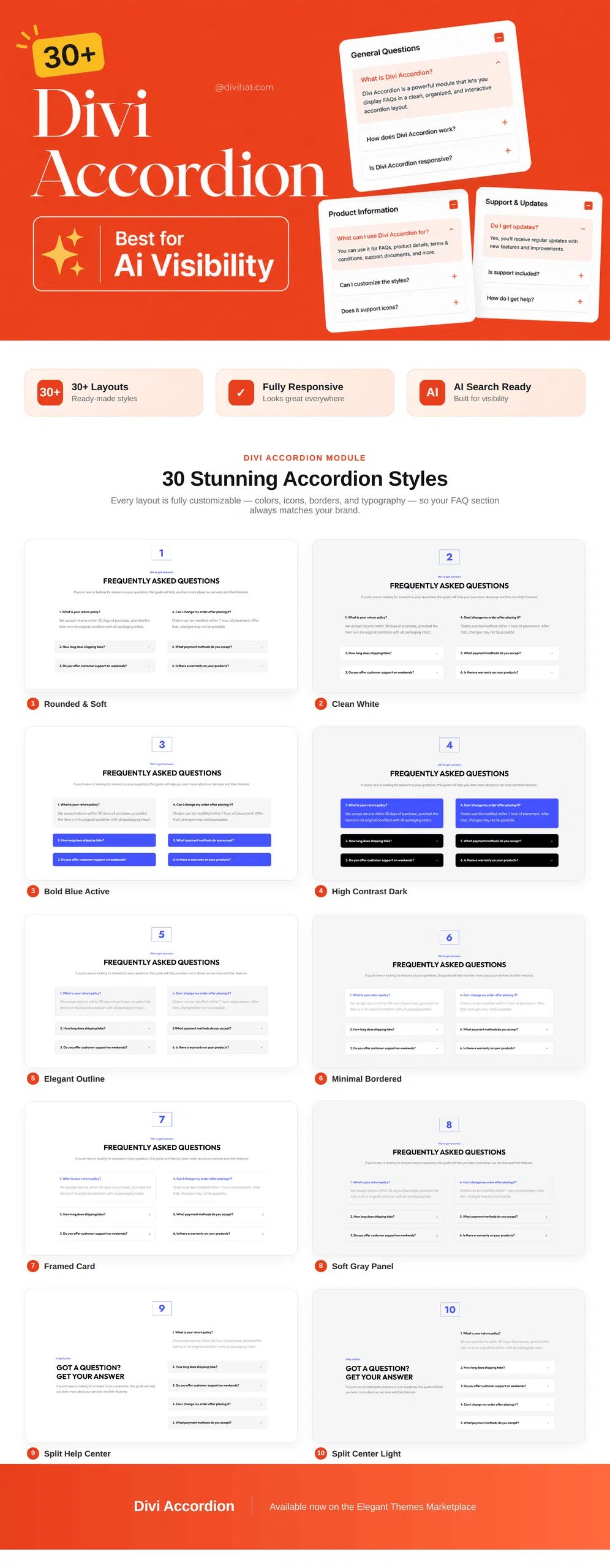
Ready-made accordion and FAQ sections for the Divi Theme. Import one, swap in your questions, match your brand colors and publish a clean, mobile-friendly FAQ in minutes. No code needed.
Everything You Need to Build Beautiful FAQ Templates
Professional divi accordion layouts designed to save you hours of work and deliver stunning results every time. Get the FAQ Templates and speed up your work.
A messy FAQ costs you sales — and search visibility.
Visitors skim. Search engines and AI assistants look for clear question-and-answer pairs. A well-structured accordion serves both: every answer stays on the page, and the page stays short enough to read.

Walls of text get skipped
Long, open FAQ lists push your call-to-action out of sight. Collapsible answers let people find their one question fast.

Styling from scratch eats hours
Toggle states, icons, spacing, borders and mobile tuning — on every client site. Start from a finished layout instead.

Messy answers get ignored.
Clear, one-question-per-item answers are easier for Google and AI search tools to understand and quote.
Complete websites, ready for your client's brand
Finance, fitness, coffee shops, education, apps, portfolios, events. Pick the closest niche, swap logo, colors and copy, and send the demo before your competitor sends a quote.
Built for Divi 5. Built to be read.
For freelancers, agencies and business owners who want polished FAQ sections without opening a design tool.
30+ premium styles
A wide variety of professionally designed accordion layouts for every use case.
Fully customizable
Match your brand with unlimited color schemes, fonts and styling options.
Mobile responsive
Looks right on every device — desktop, tablet and mobile.
Lightning-fast setup
Install and customize your accordion in minutes. No coding required, just drag and drop.
Clean Code
Built with best practices and optimized for performance and SEO.
Easy to Use
An intuitive setup makes customization a breeze, even for beginners.
30+ Premium Styles
Choose from a wide variety of professionally designed accordion layouts for every use case.

Lightning Fast Setup
Install and customize your accordion in minutes. No coding required, just drag and drop.
Fully Customizable
Match your brand perfectly with unlimited color schemes, fonts, and styling options.
Clean Code
Built with best practices and optimized for performance and SEO.
Mobile Responsive
Looks perfect on all devices - desktop, tablet, and mobile.
Easy to Use
Intuitive interface makes customization a breeze, even for beginners.
From download to done in minutes.
Import a free Divi layout with the Builder’s Portability tool, replace the demo content, and publish a website that looks like your own.
Download & unzip
Open the downloaded ZIP to find your layout’s JSON file.
Open Divi Builder
Create a new page or open an existing one in the VB.
Open Portability
Choose the Import/Export icon from the page settings.

Import the JSON
Add your text, imagery, logo. Check mobile, then publish.
Frequently Asked Question
Divi accordion questions, answered
What is a Divi accordion?
A Divi accordion is a stack of collapsible panels built with Divi's Accordion module. Only one panel opens at a time, so you can fit many questions and answers into a short, tidy section. It's the most common way to build an FAQ in Divi.
What is included in the Divi Accordion Bundle?
The bundle includes 30+ professionally designed accordion layouts, lifetime updates, priority support and unlimited website usage. All layouts are fully customizable and mobile responsive.
How do I add an accordion in Divi 5?
Import the layout file into your Divi Library, then open any page in the Visual Builder and add the saved section from the library. Edit the questions and answers inline and publish. The whole process takes a few minutes.
Do I need coding knowledge to use these layouts?
No coding knowledge required. The accordion layouts work with Divi's Visual Builder — simply drag, drop and customize using the familiar interface.
Does content hidden in an accordion still count for SEO?
Yes. Search engines read text inside collapsed accordion panels because it's part of the page's HTML. Keeping answers short and focused on one question each makes them easier to understand and quote.
Can I add FAQ schema to these templates?
Yes. The templates use a clean question-and-answer structure, so you can add FAQPage structured data with an SEO plugin such as Rank Math or Yoast, or with your own JSON-LD.
Is the WordPress Divi Theme required?
Yes. These layouts are designed specifically for the Divi Theme, so you'll need an active Divi license. If you don't have Divi yet, you can get it from Elegant Themes.
Will I receive future updates?
Absolutely. Your purchase includes lifetime updates. We regularly add new layouts and features at no additional cost.
Are the layouts mobile responsive?
Yes. Every accordion layout is fully responsive and tuned for desktops, tablets and smartphones.
What kind of support do you offer?
Priority email support for all customers. Our team typically responds within 24 hours on business days and can help with installation, customization and any questions.
Pick your plan. Keep every design.
Both plans unlock the full library. Lifetime pays for itself after your second client site.
SINGLE PACK
Divi Accordion Layouts
$29.99
/ One Time
Renews yearly. Cancel anytime.
30+ Divi 5 accordion & FAQ layouts
Unlimited website usage
Lifetime updates
Priority email support
LIFETIME MEMBERSHIP
Everything on Divi Hat
Regular price $297
$159.95
once
Pay once. No renewals, ever.
This accordion pack included
140+ Divi designs: child themes, hero sections, wireframes, layouts
All future products included
Unlimited sites & client projects
Royalty-free images
Priority chat & email support
Divi 5 and Divi 4 compatible
30-day money-back guarantee
Secure checkout via Lemon Squeezy
·
Cards & PayPal accepted
·
Works with the WordPress Divi Theme. Don't have it?