Staring at a blank Divi page when a client launch is three days out is not a great feeling. You need a page that looks sharp, loads fast, and actually converts visitors into leads, not another hour of dragging modules around trying to make a hero section look professional. That is exactly why templates for landing page projects exist, and why picking the right one saves you real time.
This roundup pulls together the landing page templates worth using in 2026, whether you want something free to test an idea or a premium, conversion-focused design you can hand straight to a client. Each pick includes pre-built layouts, hero sections, and mobile-friendly structures, so you’re not starting from a blank canvas.
Below you’ll find best landing page templates for different use cases: agency demos, lead-gen offers, product launches, and quick portfolio pages. We’ll cover what makes each one worth downloading, how customizable it is inside Divi’s drag-and-drop builder, and where you can grab free landing page templates alongside premium options if you need unlimited-use licensing for client work.
1. Divihat Divi landing page layouts
What it offers
DiviHat builds its whole library around one theme, and that focus shows. You get 26+ pre-built Divi layouts ready to drop into a page, plus 75+ hero section sliders you can swap into any layout to change the first impression without touching a single module setting. Everything is designed mobile-first, so you’re not stuck rebuilding breakpoints after the desktop version looks great and the phone version breaks. Because these are true Divi landing pages made for Divi’s visual builder, you customize by dragging, not by editing code, which matters when a client wants three color variations before lunch.
A template built for the exact builder you’re already using beats a generic one you have to fight into shape.
Who it’s for
This library suits freelance designers and agencies running multiple client sites off one Divi install, since the licensing covers unlimited use across projects rather than charging per site, much like the wider set of WordPress Divi templates for agencies. It also works for business owners who know Divi’s interface but don’t want to design a hero section from scratch. If you’ve ever needed website landing page templates you could hand to a client for a same-day demo, this is built for exactly that workflow, and the drag-and-drop customization keeps revision requests from eating your afternoon.
Pricing
DiviHat splits access two ways, and both come with a 30-day money-back guarantee:
- Membership: full access to 100+ layouts, hero sections, landing page wireframes, and 8 child themes, plus new releases as they ship
- Individual purchases: buy a single layout or hero section pack if you only need one design right now
- Usage rights: unlimited websites, including client projects, with royalty-free images included
See why premium Divi landing page layouts are worth it before deciding which tier fits your workload. With over 5,000 purchases and 4,800 five-star reviews behind it, it’s a low-risk way to stop building hero sections from zero every time a new brief lands.
2. Canva landing page templates
What it offers
Canva took its drag-and-drop design tool and stretched it to cover full landing pages, not just social graphics. You get hundreds of free landing page templates built around specific goals like webinar signups, product launches, and portfolio intros, each one editable through the same click-and-type interface Canva uses everywhere else, though free landing page templates built for Divi publish straight into WordPress instead. The catch is that these are visual mockups, not live WordPress pages, so you’ll need Canva’s site publishing feature or an export step to get a working URL.
A template that looks perfect in the editor still needs a real hosting plan before it converts anyone.
Who it’s for
Canva fits solo marketers and small business owners who want a landing page fast and don’t already run a WordPress site. It also suits agencies mocking up a design for client approval before building it in a real page builder, since Canva exports make quick, polished pitch decks. If you’re not committed to Divi or WordPress, Canva’s landing page website templates work as a standalone option, though you’ll trade away the deeper customization and hosting control that a builder like Divi gives you.
Pricing
Canva’s landing page templates split across two tiers:
- Free plan: access to a limited template selection, watermark-free downloads, basic publishing
- Canva Pro ($120/year or $15/month): full template library, premium elements, brand kit tools, and website publishing with a custom domain
It’s a solid starting point, but plan on migrating to a proper WordPress build once traffic and conversion tracking start to matter.
3. Figma Community landing page templates
What it offers
Figma’s Community tab hosts thousands of free, user-submitted landing page design templates, ranging from polished SaaS mockups to minimal portfolio layouts. These are design files, not live pages, so you get full control over layout, typography, and spacing inside Figma’s canvas before handing the file to a developer. Duplicate any file into your own workspace, swap out placeholder copy and images, and you have a client-ready mockup in under an hour.
A template that lives in a design file still needs someone to turn it into a real, working page.
Who it’s for
Designers and agencies that prototype before building fit this option best, especially teams that review layouts with clients before writing a line of code. It also suits anyone comfortable handing a finished Figma file to a developer, since these landing page templates for free downloads don’t publish on their own. If you build directly in WordPress instead, you’ll still need to translate the design into modules, which adds a step Divi users skip entirely.
Pricing
Most Community files cost nothing to duplicate and edit. Figma’s own plans layer on top:
- Free: unlimited file duplication, three collaborative files per team
- Professional ($15/editor/month): unlimited files, version history, shareable prototypes
Good for planning, not for publishing.
4. Unbounce landing page templates
What it offers
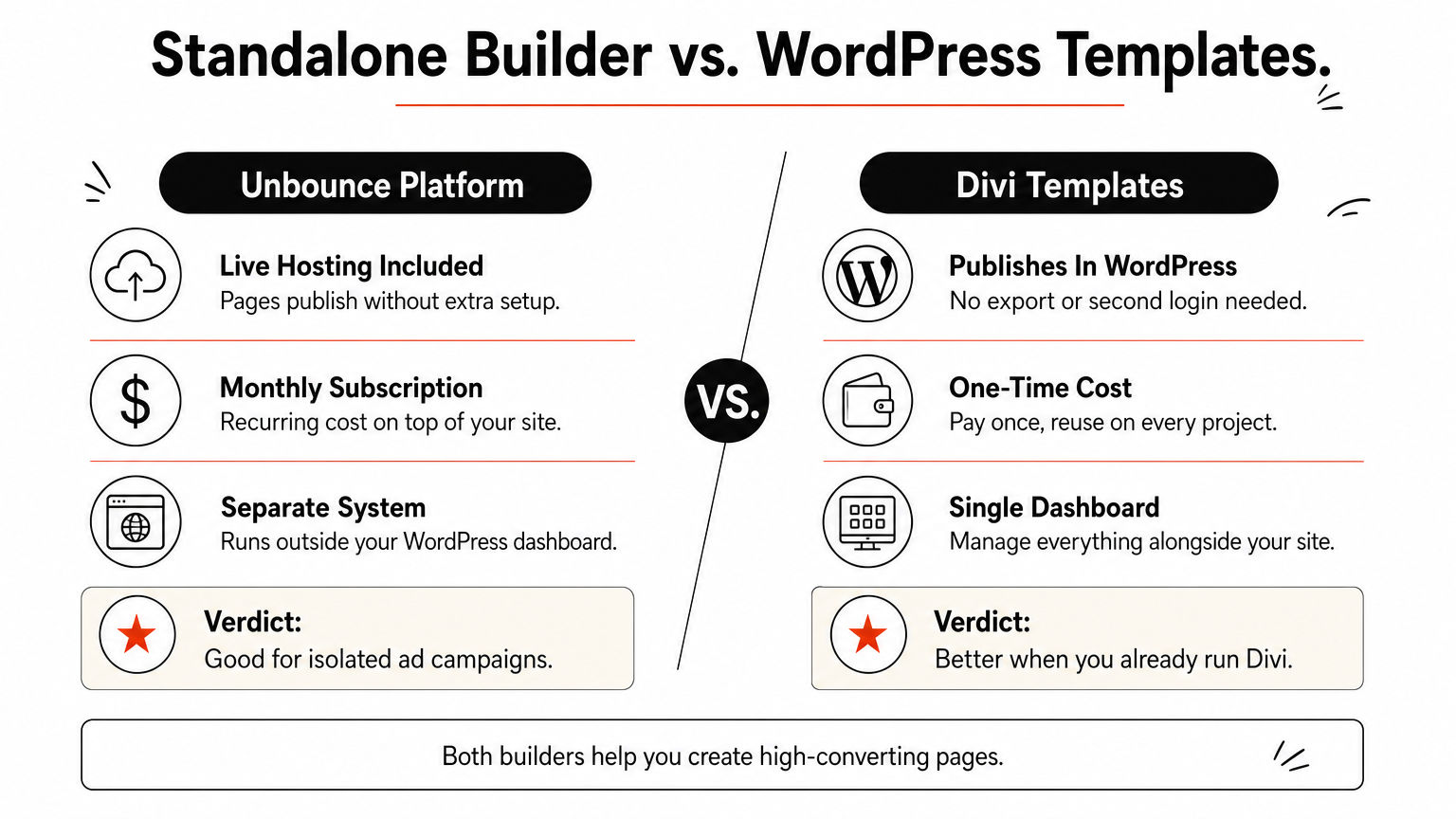
Unbounce built its entire platform around one job: publishing landing pages that convert, and its template library reflects that focus. You get over 100 best landing page templates organized by campaign type, sales pages, webinar signups, ebook downloads, each one built on Unbounce’s own drag-and-drop editor with conversion elements like countdown timers and sticky bars baked in. Unlike Figma or Canva, these templates publish live with hosting included, so there’s no export step or handoff to a developer.
A template built with built-in A/B testing beats one you have to bolt conversion tracking onto later.
Who it’s for
Unbounce suits marketing teams and agencies running paid campaigns who need to launch and test pages fast without touching WordPress at all. It also fits solo marketers who want built-in analytics and A/B testing without stitching together separate tools. If your work already lives inside Divi, though, moving campaign pages onto a separate platform means managing two systems instead of one, and a few Divi landing page tips for more sales often close the conversion gap without the extra tool.
Pricing
Unbounce runs entirely on paid plans, with no free tier:
- Launch ($99/month): core template library, one domain, standard support
- Optimize ($145/month): adds A/B testing and dynamic text replacement
- Concierge (custom pricing): higher traffic limits plus dedicated support
All plans include a 14-day free trial, so you can test templates before committing to a monthly bill.
5. Envato Elements landing page templates
What it offers
Envato Elements bundles thousands of website templates landing page designers actually reach for, covering HTML, WordPress, and builder-specific formats like Divi and Elementor. Subscribers get unlimited downloads instead of buying one template at a time, which matters if you’re testing five different layouts before picking one for a client. Most files include layered source assets, so you can swap fonts, colors, and stock photography without hunting for missing pieces later.
Unlimited downloads beat a la carte pricing the moment you need to compare more than two or three designs.
Who it’s for
Freelancers and agencies juggling multiple platforms fit this option well, since one subscription covers WordPress builds, HTML exports, and design assets like fonts and graphics in a single account. It also suits anyone who wants landing page templates design variety across niches rather than committing to one builder’s ecosystem. If you already work exclusively in Divi, though, you’ll still need to filter through non-Divi formats to find files that actually match your workflow.
Pricing
Envato Elements runs on a subscription model, not per-template purchases:
- Individual plan ($16.50/month billed annually): unlimited downloads across templates, graphics, fonts, and stock photos
- Team plan (custom pricing): shared seats for agencies managing multiple projects
No free tier exists, but a subscription pays for itself fast if you download often.
6. Adobe Express landing page templates
What it offers

Adobe Express takes Adobe’s design pedigree and packages it into a simpler, browser-based editor built for quick turnarounds. You get hundreds of free templates landing page designs alongside premium options, each organized by industry, real estate, fitness, coaching, so you’re not starting from a blank grid. Built-in access to Adobe’s stock photo library and font sets means you can swap visuals without leaving the editor, and the interface leans closer to Canva than Photoshop, so there’s no steep learning curve.
A design tool backed by Adobe’s stock library saves you the separate step of sourcing images elsewhere.
Who it’s for
Small business owners and solo marketers who want top landing page templates without hiring a designer fit this option well. It also suits teams already using Adobe Creative Cloud who want their landing page assets to match existing brand files. If you need a page that lives inside WordPress with real customization depth, though, Adobe Express feels more like a design tool than a builder.
Pricing
Adobe Express splits access into two tiers:
- Free plan: limited templates, Adobe’s basic stock library, watermark-free exports
- Premium ($9.99/month): full template library, premium stock assets, brand kit tools, and custom domain publishing
It’s a fair pick for quick mockups, less so for ongoing WordPress site work.
7. HubSpot marketplace landing page templates
What it offers
HubSpot’s marketplace ships landing page templates as part of a broader CRM and marketing platform, not a standalone design tool. Each template connects directly to HubSpot’s forms, email automation, and contact database, so a visitor who fills out a lead form on your page lands straight in your CRM without any Zapier workaround. The library covers best landing page templates for webinars, ebook downloads, and product demos, and every one is built on HubSpot’s own drag-and-drop editor rather than a generic page builder, where a free Divi webinar hero layout would do the same job inside WordPress.
A template wired into your CRM saves the integration work you’d otherwise bolt on after launch.
Who it’s for
Marketing teams already running HubSpot for email and sales pipelines get the most value here, since the templates skip the usual step of connecting forms to a separate database. It also suits agencies managing client campaigns inside HubSpot’s portal rather than WordPress. Freelancers building one-off sites for small clients, though, will find the platform heavier and pricier than what a simple Divi build needs.
Pricing
HubSpot bundles templates with its Marketing Hub tiers:
- Free CRM: limited templates, HubSpot branding included
- Starter ($20/month): full template access, no branding, basic automation
- Professional ($890/month): advanced automation, A/B testing, custom reporting
It’s a strong fit if you already live inside HubSpot, less so if you just need a page live by Friday.
Finding the right template for your launch
Seven options, one decision: match the tool to the platform you’re already building on. Design-file libraries like Figma and Canva work fine for mockups, but they hand you an extra export step before anything goes live. Standalone builders like Unbounce and HubSpot bundle hosting and automation, though you’ll pay a monthly fee and manage a second system outside WordPress. If you’re already running Divi, none of that trade-off applies. The best landing page templates for your workflow are the ones that drop straight into the builder you use every day, without a conversion step or a second login.
That’s the case for sticking with templates for landing page projects built specifically for Divi. You skip the file handoff, skip the extra platform, and get a page live in the time it takes to swap a hero section. Browse the Divi landing page templates and pick a design that matches your next client brief.