

The best SaaS landing page templates are the ones that match your stack and skills, not the ones with the nicest gradients. If you write React, start with a free Next.js starter such as Vercel’s SaaS Starter or Open SaaS. If you only need a polished marketing page, Cruip’s React template or an Astro theme is lighter. If you do not code, Framer or Figma templates get you live fastest. If you need auth and billing this week, a paid boilerplate like ShipFast, Supastarter or MakerKit saves real time. If your site runs on WordPress with Divi, Divi Hat’s hero and CTA layouts fit best.
The problem is not a shortage of options. Template galleries list hundreds of pages, most look alike, and many are screenshots you cannot actually use. A template that does not fit your stack costs you weeks of rework, no matter how good it looks.
This article compares 10 templates and starters you can use today, from free GitHub projects to paid kits. For each one you get what is inside, who it suits, what it costs and where it falls short. After the list you get a side-by-side table, a way to choose, and the steps to turn a template into a live page. Divi Hat is item one because we have 10 years of experience building websites with Divi, but it only suits WordPress sites, and we say so.
1. Divi Hat Divi 5 layouts and hero sections
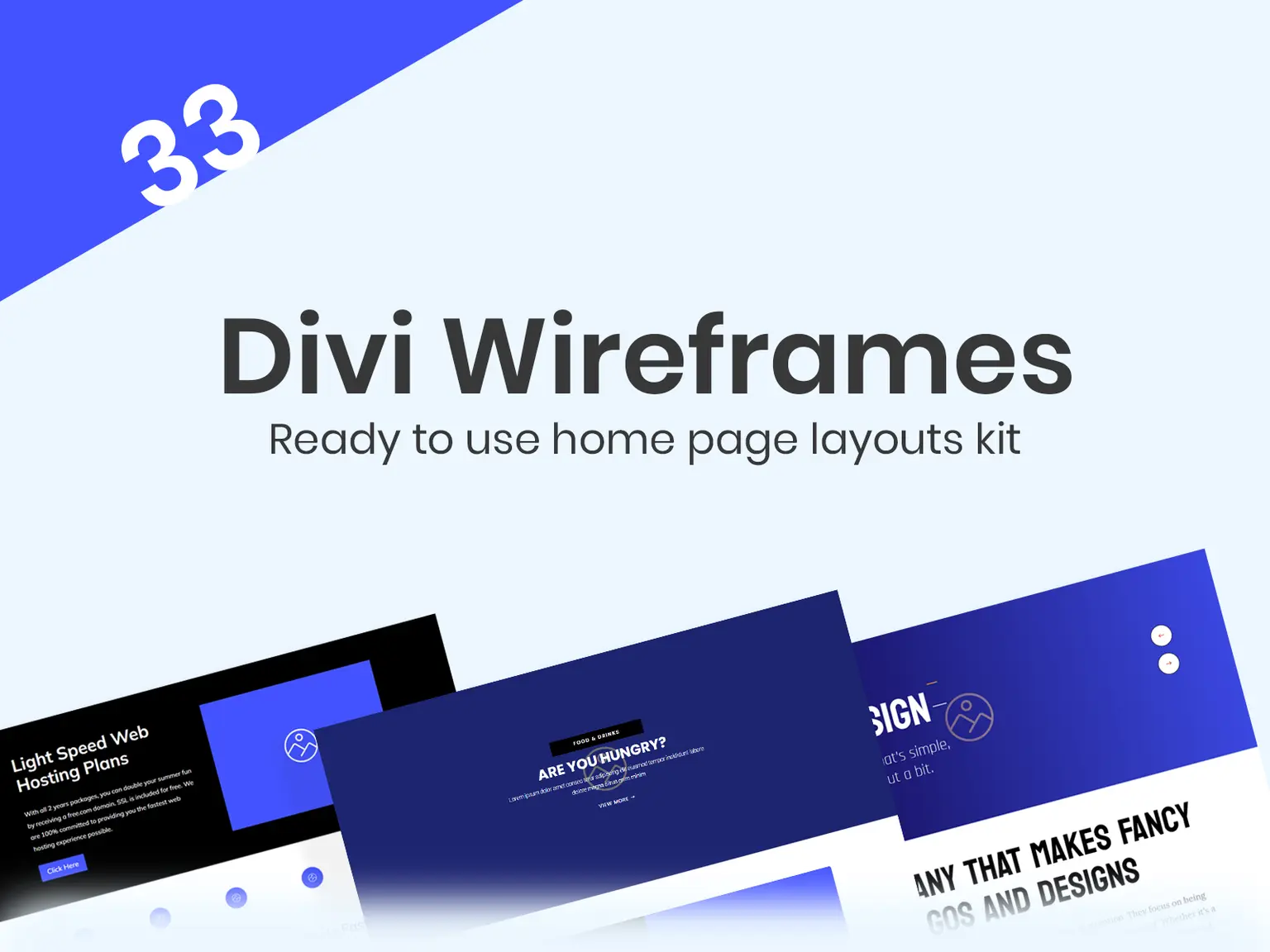
Divi Hat sells ready-made Divi 5 layouts, hero sections, CTA layouts and wireframes that you can assemble into a SaaS landing page on WordPress. It is not a SaaS app starter. It gives you the marketing page, not the login or billing.
What you get
You build the page from parts. Start with a hero, add a CTA block, and structure the rest with a wireframe. Everything edits in Divi’s visual builder, and the products carry unlimited website usage.
- Divi Hero Sections: 75+ layouts for Divi 5, $19.99.
- Divi CTA Layouts: 58 call-to-action layouts, $39.99.
- Divi Wireframe Layouts Kit: 33 layouts to structure a page, $29.99.
- Divi Layouts: ready-made page layouts, $29.99.
- Divi Accordion layouts for an FAQ section.
A SaaS page on Divi is a hero, a CTA and a wireframe, not a code project.
Who it suits and what it costs
This fits founders, freelancers and agencies who already run WordPress with Divi, especially when you build pages for several clients. A hero section plus CTA layouts costs $59.98 ($19.99 + $39.99), and you can reuse them on every site you build, client sites included. Images are royalty-free, and a 30-day money-back guarantee covers the purchase.
The catches are real. These products work only with the Divi theme, so you need your own Divi license and hosting. There is no authentication or billing, so your app lives elsewhere and the WordPress page links to it. If you would rather hand the work off, Divi Hat also offers a $199 landing page build: one Divi page, a slider with three slides and up to five sections.
2. Vercel Next.js SaaS Starter
The official Next.js SaaS Starter from Vercel is the best free choice when you want a marketing page and a working app in one repository. It stays close to standard Next.js patterns and skips the bloat.
What you get
You get a landing page and the core SaaS plumbing wired together. That means you start from a working product, not an empty folder.
- A marketing landing page with an animated terminal demo.
- A pricing page connected to Stripe Checkout.
- JWT authentication with owner and member roles.
- A team dashboard with activity logging and protected routes.
- PostgreSQL with Drizzle ORM, shadcn/ui and Tailwind CSS.
Pick this one when you want the smallest codebase that still takes payments.
Who it suits and what it costs
It suits developers who already know React and want to build on the stack Vercel recommends. It is free and open source on GitHub, so your only cost is hosting and your own time.
The catch is design range. You get one clean landing page, not a dozen layout variations, and you will restyle it to stand out. It also assumes you are comfortable with Postgres and Stripe setup. A non-developer should skip it.
3. Open SaaS
Open SaaS is the most complete free full-stack boilerplate on this list. It runs on the Wasp framework and ships a landing page, auth, payments and an admin dashboard.
What you get
Open SaaS covers more ground than most paid starters do. The trade is that you work inside Wasp, which is less common than plain Next.js.
- React, Node.js, Prisma, Tailwind CSS and shadcn/ui.
- Auth by email, Google, GitHub, Slack and Microsoft.
- Payments through Stripe, Lemon Squeezy or Polar.
- Background jobs and one-command deployment to Railway or Fly.io.
- Type safety from server to client without hand-written API types.
Open SaaS is the free option that comes closest to a paid boilerplate.
Who it suits and what it costs
It suits solo developers who want to launch a full product, including an AI-flavored one, without paying for a starter. It costs nothing to use, which makes it a strong rival to the paid kits in items 8 to 10.
The catch is the learning curve. Wasp has its own conventions, so budget time to learn them before you rely on it. If you only need a front-end page, you will carry far more code than necessary, and Cruip below is the better fit.
4. Cruip Open React Template
Cruip’s Open React Template is a free, conversion-focused landing page and nothing else. It has no auth, no payments and no backend, which is exactly why some teams prefer it.
What you get
You get a finished marketing page with clean, readable code. Designers can work from the included files while developers wire the page up.
- Next.js App Router with React Server Components.
- TypeScript and Tailwind CSS.
- Figma design files for customization.
- A polished design you can ship nearly as-is.
If your app already exists, a front-end-only template beats a boilerplate.
Who it suits and what it costs
It suits teams that already have a product and need a better public page, plus designer and developer pairs who share Figma files. It is free on GitHub.
The catch is scope. You still need to write your own copy, connect your own sign-up flow and replace the sample sections. It also gives you one visual direction, so expect to adjust colors and spacing to avoid looking like every other site using it.
5. Stone, an Astro theme
Stone is an Astro-based SaaS theme built for speed. Astro ships little JavaScript by default, so pages load fast, which helps both visitors and search rankings.
What you get
Stone is a marketing site theme with enough sections to assemble a full page. It keeps interactivity light with Alpine.js.
- 5+ pages and 15+ customizable sections.
- Dark and light mode, plus smooth page transitions.
- Tailwind CSS and Alpine.js for small interactive pieces.
For a content-heavy SaaS site, Astro’s speed is the main reason to choose it.
Who it suits and what it costs
It suits developers who care about Core Web Vitals and plan to publish lots of content, such as docs and blog posts, next to the landing page. It is free.
The catch is age. Its last update dates to early 2024, so Astro has moved on since then. Plan to update dependencies yourself, and check the repository’s recent commits before you commit to it. It also has no backend at all, so sign-up and billing live in a separate app.
6. Framer SaaS templates
Framer’s marketplace is the fastest no-code route to a professional SaaS landing page. You pick a template, edit it visually and publish on a custom domain without touching code.
What you get
Templates arrive with the usual SaaS sections already built, so you swap in your own text and images. Examples from the marketplace show the range.
- Saatosa: a free template with 12+ pages.
- Saalix: about $79, with three landing page variations and 20+ pages.
- Artify: about $45, built for AI SaaS products.
- Responsive layouts that adapt to phones automatically.
Framer gets a non-technical founder to a live page in an afternoon.
Who it suits and what it costs
It suits founders and marketers who do not code and want a design that looks custom. Template prices run from free to roughly $79 for the ones above, plus a Framer hosting plan for publishing. Check current marketplace listings, since prices change.
The catch is flexibility. Anything outside the template’s logic, such as custom app pages, is harder than in code. And you are tied to Framer’s hosting model, so moving later means rebuilding the page.
7. Figma Community SaaS website templates
Figma’s community library has free SaaS website templates, which makes it the best source for design starting points and layout inspiration at zero cost. They are design files, not live pages.
What you get
You get editable frames for the sections SaaS pages need, usually pricing tables, feature sections and demo pages. You can adjust them visually before anyone writes code.
- Fully editable frames for hero, features, pricing and demo sections.
- Easy duplication, so you can mock several variants.
- Free to use for most community files.
Figma is the cheapest way to test a layout before you commit to building it.
Who it suits and what it costs
It suits founders working with a designer or developer, and teams that want to show stakeholders a mockup first. Using the files costs nothing.
The catch is the missing last step. A Figma file does not publish itself, so you still need a developer or a page builder to turn it into a site. Quality varies widely between community files, and licensing terms differ, so read each file’s description before using it commercially.
8. ShipFast
ShipFast is the paid boilerplate with the biggest community. It is a Next.js starter that bundles landing page components, auth, payments and a blog.
What you get
You get the standard indie SaaS stack with flexibility in the choices. The community is a large part of the value.
- Next.js with either the App or Pages router.
- MongoDB or Supabase for the database.
- Stripe or Lemon Squeezy for payments.
- Google OAuth and magic links.
- An SEO-ready blog and a large Discord community.
You pay for ShipFast less for code than for a community that has solved your problem before.
Who it suits and what it costs
It suits solo developers who want to launch quickly and like having a community to ask. Pricing was listed at $199 to $249 one-time with lifetime updates, so check the current tiers on its site.
The catch is that free options now cover much of the same ground. If you already know auth and Stripe, you may be paying for convenience. Weigh $199 against the free Open SaaS first, and decide whether the community is worth the difference to you.
9. Supastarter
Supastarter is the most flexible premium starter. You can build with either Next.js or Nuxt, and it supports five payment providers.
What you get
Supastarter aims at teams who want options and a more complete feature set than a basic boilerplate.
- Next.js or Nuxt from one purchase.
- Stripe, Lemon Squeezy, Polar, Creem and Dodo for payments.
- Passkey and two-factor auth with role-based access.
- Prisma or Drizzle, plus Docker self-hosting.
- Support files for AI coding tools such as Cursor and Claude Code.
Supastarter is the premium pick when you need to choose your own framework and payment provider.
Who it suits and what it costs
It suits agencies building SaaS products for clients, and teams on Vue and Nuxt who rarely get good starters. It was listed at $299 to $1,499 one-time, depending on the tier, and the top tier adds white-labeling.
The catch is price and size. The lowest tier already costs more than most single-founder budgets need, and the codebase is large. If you only need a landing page, this is overkill.
10. MakerKit
MakerKit is the longest-running premium option, in use since 2022. It targets teams that want multi-tenant organizations and a super admin dashboard from day one.
What you get
MakerKit is built for B2B products where each customer has a team. That focus separates it from simpler starters.
- Next.js or React Router 7, with React 19, Tailwind CSS 4 and TypeScript.
- Supabase, Drizzle or Prisma for the database.
- Multi-factor auth, multi-tenant organizations and a super admin dashboard.
- Preconfigured Playwright end-to-end tests.
- Rules for AI coding assistants to read the codebase.
MakerKit is the starter for B2B products where every customer brings a team.
Who it suits and what it costs
It suits B2B founders and small engineering teams who need organizations, roles and tests built in. Pricing was listed at $299 to $599 lifetime. Confirm the tier you need before buying.
The catch is the same as other premium kits. You are buying a foundation, so the landing page is the smallest part of it. If your problem is conversion copy and layout, you will pay for features you do not use.
How to choose between these templates
Choose by what you already have: skills first, then the pages you need, then budget. The wrong match costs more than the template price, because rework eats weeks.
Match the template to your skills
Use this short filter to cut the list in half.
- You do not code: Framer (item 6) or Figma plus a developer (item 7).
- You code and want a full app: Vercel Starter (2) or Open SaaS (3) free, ShipFast, Supastarter or MakerKit paid.
- You have an app and need a page: Cruip (4) or Stone (5).
- You run WordPress with Divi: Divi Hat (1).
- You are building an AI product: Open SaaS (3) or the Artify template (6).
Compare the ten at a glance
Prices come from each source’s listing and can change, so confirm before buying.
| # | Template | Type | Price | Stack | Best for |
|---|---|---|---|---|---|
| 1 | Divi Hat | Page layouts | $19.99 to $39.99 per product | WordPress, Divi 5 | Divi users |
| 2 | Vercel SaaS Starter | Full-stack | Free | Next.js, Postgres | Lean launches |
| 3 | Open SaaS | Full-stack | Free | Wasp, React | Complete free app |
| 4 | Cruip | Landing page | Free | Next.js, Tailwind | Front-end only |
| 5 | Stone | Landing page | Free | Astro, Tailwind | Fast content sites |
| 6 | Framer templates | No-code page | Free to about $79 | Framer | Non-coders |
| 7 | Figma templates | Design file | Free | Figma | Mockups |
| 8 | ShipFast | Full-stack | $199 to $249 | Next.js | Solo founders |
| 9 | Supastarter | Full-stack | $299 to $1,499 | Next.js, Nuxt | Agencies |
| 10 | MakerKit | Full-stack | $299 to $599 | Next.js, React Router | B2B teams |
Check maintenance before you commit
Open the repository or listing and look at the last update date. A template untouched for two years will still run, but the framework underneath has moved, and you inherit the upgrade work.
A worked example shows the stakes. If you pay $199 for ShipFast and spend an extra two days updating a stale free template instead of using Open SaaS, the "free" choice may cost more. Compare total effort, not sticker price.
How to turn a template into a live SaaS landing page
Start with the page’s one goal, usually a trial sign-up or a demo booking, and make every section serve it. Then fill the template with your own copy, proof and a single call to action.
What the finished page needs
An analysis of 200 SaaS landing pages found the average H1 headline ran about 44 characters, under eight words. It also found 91% of pages dropped the top navigation, and 73% used a single CTA. Those patterns match what high-converting landing page templates already do, so keep them.
- A headline that names the problem you solve, using "you" language.
- A hero image or product screenshot that shows the software.
- Social proof such as customer logos and named testimonials.
- Features written as benefits, plus a pricing section.
- An FAQ and one repeated CTA that leads to one destination.
Keep one goal and one destination per page, and delete every section that does not serve it.
Steps from template to launch
Follow this order to avoid rework.
- Choose the template using the filter above.
- Write your headline, subhead and CTA text first, before touching design.
- Replace placeholder sections with real product screenshots.
- Add testimonials, logos or numbers you can verify.
- Connect the CTA to your sign-up or booking flow and test on a phone.
- Check load speed and publish.
Can ChatGPT build a landing page?
ChatGPT can draft your copy and write code for a section, but treat the output as a first draft. It does not know your customers, and it will produce generic claims if you do not feed it specifics.
The best use is on top of a template. Paste in your template’s section structure and ask for three headline variations, then pick one and rewrite it in your own words. Review any generated code before it ships, since it may use outdated packages or skip accessibility basics.
Pick by stack, then ship
The right SaaS landing page template is the one that fits your stack, your skills and your budget. Free starters like Vercel’s and Open SaaS cover most developers. Framer and Figma cover people who do not code. Paid boilerplates earn their price when auth and billing deadlines are tight.
If you build on WordPress, the Divi route is quick to try. A hero section and CTA layouts together cost $59.98, and you can reuse them on every project. To get the whole library of layouts, child themes, wireframes and hero sections for unlimited sites, join the Divi Hat membership.