The best lead generation landing page templates share one trait: they are built around a single goal, with a headline, a short form, proof, and one call to action, and you can edit them in a tool you already know. Pick Divi Hat if you build on WordPress with Divi. Pick Unbounce or Leadpages if you want a hosted campaign builder. Pick HubSpot if your contacts already live there, Wix for a quick free start, and ThemeForest if you would rather buy a file once and own it.
Most people lose hours at this step. Template libraries are full of attractive pages that ask for six form fields, bury the button, or lock you into an editor you dislike. A template that does not fit your workflow ends up half customized and never published.
This guide compares six sources of lead gen landing page templates. For each one you will see what you get, who it suits, and what to watch for. Then you get a side-by-side table, a checklist for judging any template, and a five-step routine for customizing one. Divi Hat is our own library, so it comes first, and we describe it with the same limits as the others.
1. Divi Hat layouts for lead generation pages
What you get
Divi Hat gives you building blocks for Divi 5 that snap together into a lead page, rather than one locked template. Three packs matter most for lead capture, and each allows unlimited website usage, including client sites:
- Divi Hero Sections, $19.99: 75+ hero layouts for the top of the page, where your headline and form go.
- Divi CTA Layouts, $39.99: 58 call-to-action layouts, from banners to boxed sections, for repeating the offer lower on the page.
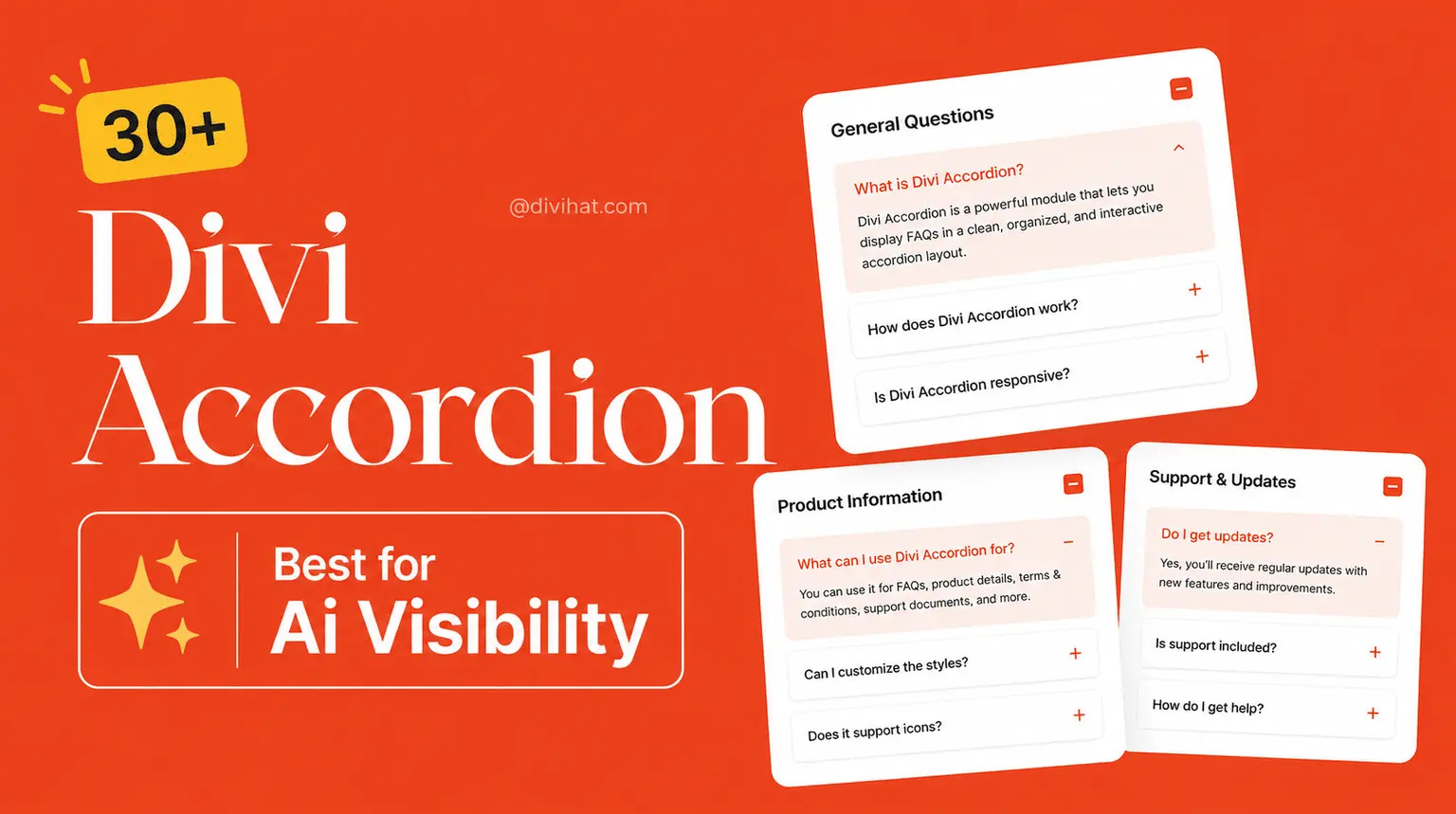
- Divi Accordion Bundle, $29.99: 30+ Divi 5 accordion modules for an FAQ that answers objections.
A worked example shows the cost. One hero, one CTA layout, and one accordion add up to $19.99 + $39.99 + $29.99 = $89.97 one time, and you reuse them on every later page. If you build lead pages often, the Divi Hat Membership opens the full library of layouts, child themes, wireframes, and hero sections. If you would rather not assemble anything, the Divi Web Design Landing Page service costs $199 for one custom page built with Divi, with a three-slide slider and up to five sections.
A lead page is a hero, a repeated call to action, and an FAQ, so you only need three kinds of layout.
Who it suits and what to watch
Freelancers and agencies get the most from this route. You buy a layout once, change the colors, fonts, and copy in the Divi Builder, and reuse it across client projects without per-site fees. A 30-day money-back guarantee covers the purchase.
Watch two limits. The CTA and Accordion packs work only with the Divi theme, so they are useless on another platform. A layout is also design only: you still add a form with Divi’s Contact Form or Email Optin module, connect it to your email tool, and set up tracking yourself. Divi Hat also gives away free landing page layouts through email sign-ups at times, which is a low-risk way to test the style.
2. Unbounce lead generation templates
What you get
Unbounce keeps a dedicated lead generation category of landing page templates, organized by offer rather than by look. The examples include an agency lead generation page, a giveaway page, an education lead gen page, a travel guide download, a real estate resource download, an insurance page, and a telehealth booking page.
That structure helps because the offer decides the layout. A guide download needs a short form and a preview of what is inside. A booking page needs trust signals and a clear time commitment.
Choose the template by the offer you are making, not by the color palette.
Who it suits and what to watch
Marketers who run paid campaigns and want a hosted page builder will feel at home. You edit and publish inside the platform, so there is no WordPress site to maintain and no hosting to set up.
Expect to rewrite everything. The sample pages carry made-up brand names and copy, so treat them as structure, not content. Hosted builders also charge a recurring plan, so check current pricing before you commit to building ten pages.
3. Leadpages landing page templates
What you get
Leadpages lets you filter its template library by industry, goal, and style. That is the fastest way to cut a large library down to a handful of pages that fit lead capture. You can customize a template in minutes in its editor, or let its AI build a first draft for you.
Use the filters in a set order. Start with the goal, because it decides the page’s structure. Add your industry second, and leave style for last, since colors and fonts are the easiest things to change.
Filter by goal first, because structure is hard to fix later and styling is not.
Who it suits and what to watch
Small business owners and solo marketers like this option because the filters give guidance. If you are unsure what a lead page should contain, the goal filter shows you the pattern before you write a word.
An AI draft is only as good as the brief you give it. Feed it your offer, your audience, and one proof point, or you will get generic copy that reads like every other page. Check what your plan includes for form submissions and integrations before you build.
4. HubSpot landing page templates
What you get
HubSpot offers a library of mobile-optimized templates and a drag-and-drop editor, and its landing page tool is free to start with. The page sits in the same account as your forms and contact records, so a submission becomes a contact without a connector or a spreadsheet in between.
Mobile optimization matters here because a large share of paid social and email clicks land on phones. A template that only looks good on a desktop preview will waste your ad spend.
If your leads end up in HubSpot anyway, build the page where they will be stored.
Who it suits and what to watch
Teams that already use HubSpot for email or CRM get the smoothest path from click to contact. Marketing and sales see the same record, and follow-up emails can start right after the form is submitted.
Start free, but read the plan limits. Some features, such as testing or advanced reporting, may sit in paid tiers, so check them before you plan around them. If you do not use HubSpot’s CRM, the main benefit disappears and a simpler tool may fit better.
5. Wix one-page landing page templates
What you get
Wix offers one-page landing page templates that are free to start from, and every template is fully customizable with drag and drop. You pick a layout, swap the text and images, and publish without touching code.
These templates are designed as small websites, not as single-goal pages. Before you publish, strip the menu, the footer links, and any extra buttons. A visitor who can click away will do it.
A template built as a mini website needs trimming before it can behave like a lead page.
Who it suits and what to watch
Local service businesses and small business owners running a single campaign fit best. You get a presentable page in an afternoon, with no developer and no separate hosting.
Know the trade-off. A Wix design stays on Wix, so you cannot move it to another platform later. Check what a paid plan adds, such as a custom domain, before you commit. Also confirm where form submissions go, and connect them to your email tool so no lead sits unread in a dashboard.
6. ThemeForest lead generation templates
What you get
A search for "lead generation" on ThemeForest returns about 479 items across several formats, bought one at a time. Prices on the first results page mostly run from $6 to $25, with an outlier at $99. The formats include:
- HTML and Bootstrap landing pages with a working PHP or Mailchimp form.
- WordPress and Elementor template kits.
- Unbounce template files.
- PSD and Figma designs for a designer to build out.
You pay once and the file is yours. There is no monthly plan, which suits one-off projects.
A cheap template costs nothing extra to buy and a lot to maintain, so check its age before its price.
Who it suits and what to watch
Developers and designers who are comfortable with code, Photoshop, or Figma get the best value. You control the hosting, the form handling, and the final page, and you own the file outright.
Check the update date on every listing. Many lead generation items were last updated between 2018 and 2020, and some have few sales or ratings. Look at sales count, rating, and last update together, then test the live preview on your phone. A PHP form still needs configuring, and an old script may not work with current hosting.
How to choose and customize a template
Side-by-side comparison
The right source is the one whose editor you will actually use. Read the table by the second column first, because the editor decides how fast you can edit and how much you will pay in time.
| Source | Editor | Template format | Best fit |
|---|---|---|---|
| Divi Hat | Divi Builder on WordPress | Hero, CTA, and FAQ layouts, packs from $19.99 or membership | Divi users and agencies |
| Unbounce | Hosted builder | Lead generation templates sorted by offer | Paid campaigns |
| Leadpages | Hosted builder | Filter by industry, goal, and style, plus AI draft | Small businesses |
| HubSpot | Hosted drag and drop | Mobile-optimized template library | HubSpot CRM users |
| Wix | Hosted drag and drop | One-page templates | A quick free start |
| ThemeForest | Your own code, Photoshop, Figma, or WordPress | Single files, about $6 to $25 on the first results page | Developers and designers |
Check any template before you commit
Whatever source you choose, run the template through this list. A page that fails two or more checks will cost you more to fix than to replace.
- One goal: no menu and no links that lead away from the page.
- Form above the fold, with the fewest fields you can follow up on. Name and email suit a download. Ask for a phone number only if you will call.
- Message match: the headline repeats the promise of the ad or email that sent the visitor.
- Proof near the form: a logo strip, a short testimonial, or a number you can back up.
- A repeated call to action after the proof section.
- Mobile layout with thumb-sized buttons and a form that works without zooming.
- One tracked conversion event, so you know what to improve.
Every extra field and every extra link is a reason for a visitor to leave.
Customize it in five steps
This routine works in any of the editors above and takes an afternoon.
- Write the offer in one sentence, naming who it is for and what they get.
- Replace the headline and subheading so they repeat that sentence.
- Cut the form down to the fields you need for the first follow-up.
- Add one piece of proof next to the form, and a second near the repeated call to action.
- Connect the form to your email tool, test it on a phone, publish, and then change one element at a time.
Can ChatGPT build a landing page for you? It can draft headline options, body copy, and a basic HTML page. It cannot host the page, connect your form to an email tool, or track conversions. Use it for copy variants, then paste the winners into a template from the list above.
Choose your editor, then your template
A good lead page is simple: one offer, a short form, visible proof, and a button that appears more than once. Any of the six sources above can give you that structure. What separates them is the editor you work in, how much you want to pay up front, and whether you want to own the files.
If you build with Divi, the quickest path is a hero, a CTA layout, and an FAQ that you can reuse on every client project. You can see what the Divi Hat Membership includes and decide whether the full library beats buying single packs. If you use another platform, pick the matching source, run the checklist, and publish a first version this week.