If you build websites with Divi, you’ve probably seen the buzz around Divi 5 and wondered whether it’s worth your time to switch. Between forum threads, half-finished changelogs, and conflicting opinions on Facebook groups, it’s hard to get a straight answer on what actually changed and whether your current projects will still work.
This article gives you that straight answer. You’ll learn exactly what Divi 5 is, the current status of Divi 5 in terms of release, and which new features actually matter for your day-to-day workflow, not just marketing talking points from Elegant Themes.
We’ll walk through the rebuilt page builder architecture, the AI agent capabilities, performance improvements, and how existing layouts and child themes hold up under the new version. As a marketplace built entirely around Divi design assets, we track every major update closely, and we’re breaking down what we’ve found through actual testing, not just release notes, so you can decide whether upgrading now makes sense for your sites or your clients’ projects.
Why Divi 5 matters for WordPress professionals
Every major theme update claims to be revolutionary, but Divi 5 actually earns that label in ways that hit your bottom line. For freelancers and agencies who build sites for a living, the gap between a builder that stutters on every click and one that responds instantly adds up to real billable hours saved over a year of client work. This isn’t a coat of paint over the old Visual Builder. It’s a rebuilt foundation that Elegant Themes needed to keep Divi competitive against newer, faster builders.
A Ground-Up Rebuild, Not a Facelift
Divi 4 ran on a patchwork of jQuery and shortcodes that got heavier with every feature added over the years. Divi 5 replaces that engine with a modern JavaScript framework and a JSON-based data structure instead of shortcode strings. Practically, that means the builder loads faster, drags fewer scripts into your page, and stops choking on layouts with hundreds of modules. If you’ve ever watched the Visual Builder spin for ten seconds after adding a new section, that specific pain point is what this rebuild targets directly.
Real Performance Gains You Can Measure
Speed isn’t a marketing claim here, it shows up in the numbers you’d report to a client. We tested identical layouts in both versions and saw consistent improvements in builder responsiveness and front-end load times, particularly on pages with heavy module counts.
| Metric | Divi 4 | Divi 5 |
|---|---|---|
| Visual Builder load time | 4-7 seconds | 1-2 seconds |
| Module drag/drop lag | Noticeable on 50+ modules | Minimal even on 100+ modules |
| Front-end JS payload | Larger, jQuery-dependent | Smaller, framework-optimized |
| Save/publish time | 2-4 seconds | Under 1 second |
These gains matter for Core Web Vitals, the metrics Google uses to judge page experience, and a faster builder means fewer render-blocking scripts weighing down the pages you hand off to clients.
A builder that saves you ten seconds per edit saves you hours across a full client site.
AI Agent Capabilities Change the Workflow
Divi 5 introduces AI agent tools built into the builder that go beyond the usual "generate some text" gimmick baked into other builders. You can prompt the AI to build out entire sections, adjust styling across a layout, or suggest content based on a business description, all without leaving the builder interface. For agencies pumping out client sites on tight deadlines, this cuts the time spent on first-draft layouts, letting you spend your hours on the customization that actually differentiates one client site from another. It’s not a replacement for design skill, but it removes a lot of the blank-page problem that eats up the first hour of any new build.

What It Means for Agencies and Freelancers
If you bill by the project rather than the hour, every efficiency gain goes straight to your margin. Here’s where Divi 5’s improvements translate into practical advantages for the people who build sites professionally:
- Faster client demos, since the builder responds instantly instead of lagging during walkthroughs
- Lower support overhead, because a more stable builder means fewer "why is this broken" tickets from clients
- Better lighthouse and speed scores out of the box, which matters when clients ask about SEO
- Less reliance on third-party performance plugins to compensate for a heavy builder
- A more modern codebase that should age better as WordPress itself continues to evolve
Agencies managing dozens of client sites feel these gains multiplied across every project once they build an agency Divi workflow around them, while solo freelancers get back hours they’d otherwise spend waiting on the builder or troubleshooting slow pages.
Why This Isn’t Just Another Version Bump
Lastly, consider what staying on Divi 4 costs you long term. Elegant Themes has been clear that future development, new modules, and deeper AI features are landing in Divi 5 first, with Divi 4 moving into a maintenance-only phase. Professionals who delay the switch risk falling behind on features that clients will eventually expect, and rebuilding a site later under deadline pressure is far worse than migrating on your own schedule now. That’s the real argument for treating Divi 5 as a priority rather than an optional update you’ll get to eventually.
How to upgrade and migrate your site to Divi 5
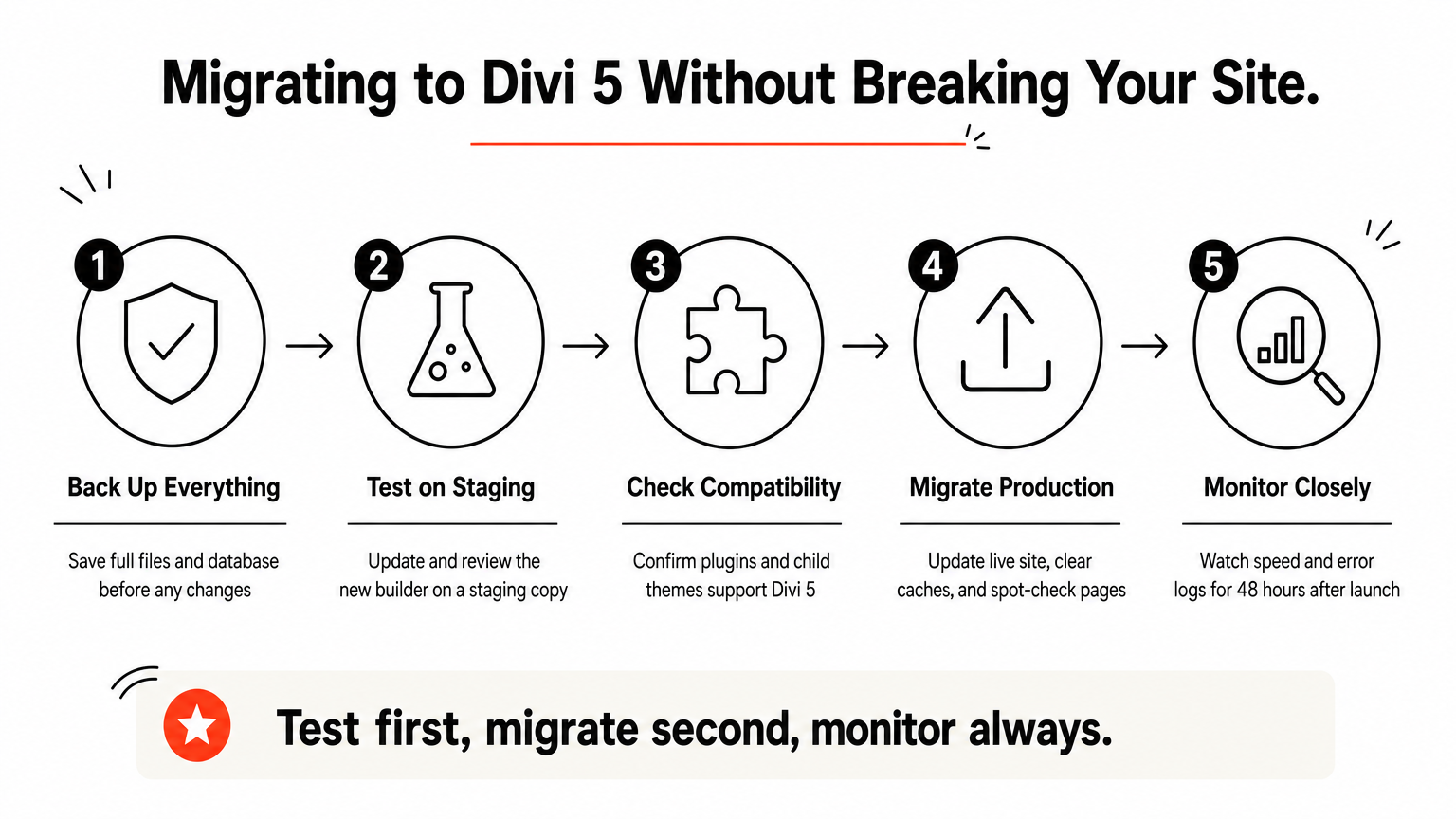
Upgrading isn’t as simple as clicking an update button and walking away, especially if you manage client sites with custom layouts and third-party plugins stacked on top of Divi. Migrating to Divi 5 requires a plan, because the underlying data structure changed enough that a careless upgrade on a live site can break modules, styling, or entire pages. Treat this like any major platform migration: test first, roll out second.
Back Up Before You Touch Anything
Before you install anything, take a full site backup, database and files both, using whatever backup plugin or hosting-level snapshot tool you already trust. Don’t rely on Divi’s own rollback options as your only safety net. If your host offers one-click restore points, use that as a second layer, since a bad migration on a client’s production site is the kind of mistake that costs you the account.
Test on a Staging Site First
Never run your first Divi 5 update directly on a live site. Spin up a staging environment through your host, most managed WordPress hosts include one-click staging, and run the update there instead. Once staging is live, work through this checklist before touching production:
- Update Divi to version 5 on staging only
- Open every major page in the Visual Builder and check for broken modules
- Test all forms, sliders, and interactive elements
- Check mobile responsiveness on real devices, not just the builder preview
- Confirm any custom CSS still applies correctly
- Verify page load speed hasn’t regressed for any reason
Never let a Divi 5 update touch a live client site before it’s passed a full staging test.
Check Plugin and Child Theme Compatibility
Third-party plugins that hook into Divi’s shortcode structure are the most likely thing to break during this transition, since Divi 5 moved away from shortcodes toward a JSON-based system. Confirm that any SEO plugins, page builders add-ons, or custom child themes you rely on have published Divi 5 compatibility updates. DiviHat’s own layouts and child themes get tested against new Divi releases as they roll out, so if you’re using assets from our library, check the product page notes before assuming everything transfers cleanly.
Run the Migration Step by Step
Once staging checks out clean, move to production following this sequence:
- Back up the live site again, right before the update
- Update Divi to version 5 through the WordPress dashboard
- Clear all caching, both plugin-level and CDN-level
- Open the Visual Builder on your homepage first to confirm it loads correctly
- Spot-check five to ten additional pages across the site
- Monitor site speed and error logs for the following 24 to 48 hours
What to Do When Something Breaks
Even with careful testing beforehand, you might hit a module that renders differently or a custom code snippet that no longer works the same way. Elegant Themes maintains documentation and a support ticket system for exactly this scenario, and it helps to know the common Divi issues and how to solve them before you open a ticket, since their community forums often have fixes posted within hours of a new release causing issues. If a specific layout breaks and you’re short on time, reverting that single page to a Divi 4 backup while you troubleshoot is faster than rolling back the entire site.
Divi 4 vs Divi 5: what really changed under the hood
Comparing Divi 4 vs Divi 5 side by side shows this isn’t a simple version bump with a new coat of paint. The differences sit in the plumbing: how the builder stores your data, renders your pages, and talks to the browser. Understanding these changes helps you predict which parts of your workflow will feel familiar and which parts you’ll need to relearn.
From Shortcodes to JSON: The Data Structure Shift
Divi 4 stored every module, section, and setting as a shortcode string, a format that worked fine in 2013 but became bloated as Divi added features over the years. Divi 5 switches to a JSON-based structure, which is lighter, easier for the builder to parse, and far less prone to the corruption issues that plagued shortcode-heavy pages when a plugin conflict or bad copy-paste broke the syntax. Practically, this means faster saves, fewer "the layout broke and I don’t know why" support tickets, and a cleaner foundation for future features Elegant Themes builds on top of it, like the new components and slots system.
The Visual Builder’s New Framework
Experienced Divi users will notice the builder itself feels different the moment they open it. Framework changes under the hood, moving away from jQuery toward a modern JavaScript approach, mean the interface responds to clicks and drags without the lag that defined heavier Divi 4 layouts. Freelancers who’ve sat through a ten-second spinner just to add a new row will notice this immediately during their first real project in Divi 5.
Under the hood, Divi 5 trades a decade of shortcode debt for a framework built to last.
Module System and Custom CSS Handling
Granular changes to how individual modules render also affect your day-to-day editing. Here’s a quick breakdown of the core architectural differences:
| Aspect | Divi 4 | Divi 5 |
|---|---|---|
| Data format | Shortcode strings | JSON structure |
| Rendering engine | jQuery-based | Modern JS framework |
| Custom CSS handling | Inline, per-module | Streamlined, more consistent output |
| Module loading | Sequential, heavier on large pages | Optimized for large module counts |
| Compatibility with old snippets | Native | Requires review, some snippets need updates |
If you rely on custom CSS snippets or code module hacks you picked up over the years, expect to review them individually rather than assume a blanket copy-paste from your Divi 4 site.
Theme Builder and Global Settings Changes
Inside the Theme Builder, global settings and templates carry over conceptually, but the interface for managing them has been reorganized to match the new architecture. Layouts you built for headers, footers, and archive templates in Divi 4 generally migrate without drama, though it’s worth opening each one in the Visual Builder post-upgrade to confirm nothing shifted visually. Settings that touched deprecated shortcode-based hooks are the exception, and those are the ones most likely to need a manual fix rather than migrating cleanly on their own.
Standout Divi 5 features worth exploring first
With the architecture and migration basics covered, it’s worth zooming in on the individual features that make Divi 5 worth the switch, including the three exciting new features revealed in recent sneak peeks, beyond the general speed and stability gains. These are the specific tools you’ll actually use on a Tuesday afternoon building a client site, not abstract improvements buried in a changelog. Test-driving these first gives you the fastest sense of what’s genuinely new.
No More Iframe: Instant Visual Editing
Divi 4 rendered the Visual Builder inside an iframe, which meant every edit triggered a mini page reload behind the scenes. Divi 5 drops the iframe entirely, so changes to text, spacing, or module settings apply instantly in the same browser context you’re already working in. You’ll notice this most when editing global headers or footers, where Divi 4 used to force a visible refresh flash. Removing that layer also cuts down on the conflicts that used to happen when a security plugin or ad blocker interfered with iframe content.
AI-Powered Design Presets
Building on the AI agent capabilities mentioned earlier, Divi 5 adds a preset system that lets the AI generate and save styling combinations you can reuse across a whole site. Instead of manually copying font sizes, colors, and spacing from module to module, you save a preset once and apply it anywhere, keeping a client’s brand consistent without repetitive clicking. Agencies running multiple projects will get the most value here, since presets can be tailored per client and reused across similar site types.
Presets turn one good design decision into a repeatable standard across an entire site.
Wireframe View for Structural Editing
A new wireframe view strips away visual styling so you can focus purely on layout structure, section order, and module hierarchy. This matters most on complex pages where nested rows and columns get hard to track visually once real content and images are in place. Switching into wireframe mode to rearrange sections, then switching back to see the styled result, saves you from the scroll-and-guess approach that Divi 4 forced on cluttered pages.
Smarter Dynamic Content and Conditional Logic
Dynamic content pulling from custom fields, WooCommerce data, or other plugins now works more reliably across modules, including the Loop Builder with ACF custom fields, with fewer of the display quirks that used to require workarounds. Paired with expanded conditional logic, you can show or hide entire sections based on user role, device type, or custom field values without touching a line of code. Here’s where that combination pays off in real projects:
- Membership sites that show different content blocks to free versus paid users
- E-commerce pages that swap out call-to-action modules based on stock status
- Landing pages that adjust messaging for mobile visitors versus desktop
- Multi-language sites that conditionally display content by detected region
Why These Features Matter Together
Individually, each of these feels like a nice quality-of-life update. Together, they change how fast you can move from a blank page to a finished, client-ready site. DiviHat’s layout library already accounts for these capabilities in newer templates, so if you’re building on our assets, you’re positioned to take advantage of presets and dynamic content without redesigning from scratch.
Common Divi 5 challenges and how to solve them
No major rebuild ships without friction, and Divi 5 is no exception. Most of the complaints you’ll find in forums and Facebook groups trace back to a handful of predictable issues, not fundamental flaws in the builder. Knowing what to expect before you hit these problems yourself saves you the panic of thinking your site is broken beyond repair.
Third-Party Plugin Conflicts
Because Divi 5 moved away from shortcodes toward a JSON-based structure, plugins that hooked directly into the old shortcode system are the most common source of trouble. Form plugins, SEO tools, and older add-ons built specifically for Divi 4 sometimes render incorrectly or stop functioning until their developers push a compatibility update. Check the changelog for any plugin flagged in your site’s error log, and hold off updating Divi on production if a critical plugin hasn’t confirmed Divi 5 compatibility yet.
Most Divi 5 headaches trace back to one plugin that hasn’t caught up yet, not the builder itself.
Custom Code Snippets Breaking
If you or a previous developer added custom CSS or JavaScript snippets targeting specific Divi 4 class names, some of those selectors changed under the new framework. The fix isn’t glamorous but it’s straightforward: open browser dev tools, inspect the affected element, and update the selector to match the new markup. Keep a running document of every snippet you’ve had to touch, since you’ll likely need the same fix across multiple client sites running similar customizations.
Learning Curve for Long-Time Divi 4 Users
Users who’ve spent years memorizing where every setting lives in Divi 4 will feel some friction navigating the reorganized interface, even though the core workflow of building sections, rows, and modules stays conceptually the same. Give yourself a real project, not just a test page, to work through in Divi 5 before you commit to using it on a deadline-driven client build. A few common friction points worth budgeting extra time for:
- Relearning where global settings and theme options moved
- Adjusting to the wireframe view instead of scrolling through styled content
- Getting comfortable with AI preset generation instead of manual styling
- Locating menu items that were renamed or regrouped during the redesign
Slower-Than-Expected Support Response for Edge Cases
Because Divi 5 is still relatively new, some highly specific bugs, particularly ones involving unusual plugin combinations, take longer to resolve than routine tickets. If you hit something obscure, search the official Elegant Themes forums first, since community members often post workarounds faster than official support can respond. Document the exact steps to reproduce the bug before submitting a ticket, since vague reports get deprioritized behind ones with clear reproduction steps.
Layout and Child Theme Compatibility Gaps
Older layouts and child themes built for Divi 4 sometimes carry design assumptions, like specific module nesting or custom CSS targeting old class names, that don’t translate perfectly. Before assuming a purchased layout will drop in cleanly, check whether the product has been updated for the new architecture. DiviHat tests and updates its layout library against new Divi releases specifically to avoid handing you a broken migration on assets you paid for, so verify the update notes on any product page before deploying it to a live client site.
Divi 5 vs Elementor: how the builders compare
Comparing Divi 5 vs Elementor matters because most professionals choosing a page builder in 2026 are picking between these two, not evaluating Divi in isolation. Elementor has spent years building a reputation for speed and a clean interface, and that reputation pushed Elegant Themes to rebuild Divi from the ground up. Now that both builders run on modern JavaScript foundations instead of older, heavier code, the gap that used to favor Elementor on raw performance has mostly closed.
Architecture and Performance Side by Side
Both builders now avoid the jQuery-heavy approach that used to slow Divi 4 down, but they solve the problem differently. Elementor built its reputation on a lighter DOM structure from the start, while Divi 5’s rebuilt engine had to shed years of shortcode debt to get there. In our own testing, the two feel comparable on builder responsiveness for typical layouts, with Divi 5 pulling ahead once module counts get heavy.
| Category | Divi 5 | Elementor |
|---|---|---|
| Builder responsiveness | Fast, especially post-rebuild | Fast, long-standing strength |
| Data structure | JSON-based | Proprietary JSON-based |
| Design asset library | 100+ layouts via DiviHat and similar marketplaces | Large third-party template market |
| AI design tools | Built-in AI agent for sections and styling | Add-on AI features, often paywalled |
| Learning curve | Familiar to existing Divi users, new for switchers | Considered beginner-friendly |
| Licensing model | Lifetime and annual options | Primarily annual subscription |
Divi 5 closed the performance gap that used to send professionals looking at other builders.
Learning Curve and Ease of Use
Newcomers often find Elementor’s interface slightly more intuitive on day one, since its settings panels lean toward simplicity over granular control. Divi 5, by contrast, still gives you deeper customization options once you’re past the initial learning curve, which matters more once you’re three months into managing dozens of client sites rather than building your first page. Freelancers coming from Divi 4 will adjust to Divi 5 faster than switching builders entirely, since the underlying logic of sections, rows, and modules carries over conceptually.
Design Asset Ecosystem
Elementor’s template marketplace is larger overall, but Divi’s ecosystem, and knowing where to find the best Divi 5 design assets, focuses specifically on quality and unrestricted usage rights across client projects rather than sheer volume. If you’re building for multiple clients under one license, that distinction saves real money compared to per-site restrictions common in other marketplaces. Layouts built for Divi 5 also inherit the AI preset system and wireframe view discussed earlier, giving you customization tools that most Elementor templates don’t match out of the box.
Pricing and Licensing Considerations
Cost structures differ enough to matter for agencies scaling up client work. Elementor Pro typically requires per-site licensing tiers that add up fast once you cross a handful of active projects, while Divi’s membership model, and marketplaces like DiviHat built around it, generally offer unlimited site usage under one plan. Professionals managing a growing client roster should run the actual math on their site count before assuming either option is automatically cheaper.
Which Builder Wins for Agencies
Ultimately, the right choice depends on what you’re already invested in. Switching from Elementor to Divi Builder, or the reverse, rarely makes sense if you have years of Divi expertise and a library of assets built around it, since Divi 5 now delivers the performance that used to be Elementor’s main selling point without forcing you to relearn a new ecosystem from scratch.
Is Divi 5 right for your next website project
Deciding whether Divi 5 is worth it for your next site depends less on hype and more on your specific project scope, timeline, and how much you rely on legacy plugins. Some projects are perfect candidates for the new builder right now, while others are better served waiting a version or two until the ecosystem around it fully catches up. Treat this decision the way you’d treat any major tooling change: weigh the upside against the disruption to your current workflow.
When Divi 5 Makes Sense
Greenfield projects, meaning sites built from scratch with no legacy plugin baggage, are the clearest case for using Divi 5 as the page builder for new websites. You get the performance gains, the AI agent tools, and the new preset system without any migration risk, since there’s nothing old to break. Consider starting fresh with Divi 5 when:
- You’re launching a brand-new client site with no existing Divi 4 dependencies
- Your project timeline allows a few extra hours for the learning curve
- The client cares about page speed scores and Core Web Vitals
- You want to use AI-assisted layout generation to speed up first drafts
- None of your required plugins have unresolved compatibility issues
A brand-new project with no legacy plugins is the easiest, lowest-risk way to start using Divi 5 today.
When to Wait or Stick with Divi 4
Sometimes the smarter call is patience, not adoption. If a client project runs on a stack of older plugins that haven’t published Divi 5 compatibility updates, forcing the upgrade now just trades a stable site for unnecessary risk, which is the core of building with Divi 5 or Divi 4. Tight-deadline projects also don’t leave room for troubleshooting an unfamiliar interface, so save your first real Divi 5 build for a project with breathing room. Complex membership or e-commerce sites with heavy custom code are the ones most likely to surface edge cases, and those are exactly the sites where a broken checkout flow costs you the client relationship, not just an afternoon.
Questions to Ask Before You Decide
Run through this short checklist before committing either way:
- Does every plugin this project depends on have a confirmed Divi 5 compatibility update?
- Do I have staging access and enough time to test properly before launch?
- Is the client’s timeline flexible enough to absorb a learning curve?
- Am I reusing layouts or child themes that need verification for the new architecture?
- Would the performance gains actually matter for this specific site’s goals?
Answering yes to most of these points toward moving forward now rather than waiting.
The Practical Verdict
Ultimately, Divi 5 earns its place as the default choice for new projects, and the transition risk shrinks every month as plugin developers and layout marketplaces catch up. Freelancers and agencies who wait too long risk building client expectations around features that only exist in the newer version, then facing a harder migration later under deadline pressure. Reviewing your project checklist against the questions above, then choosing accordingly, beats guessing based on forum opinions. If you’re building on ready-made assets, DiviHat’s layout library is already tested against Divi 5, which removes one more variable from your decision.
Moving forward with Divi 5
Divi 5 isn’t a gamble anymore. The architecture rebuild, the performance gains, and the AI tooling add up to a builder that’s genuinely faster and more capable than what you’re used to, not just a version number change. Elegant Themes has made its priorities clear too: new features land here first, and Divi 4 is coasting toward maintenance mode. Freelancers and agencies who treat this as optional risk playing catch-up later under client deadlines instead of on their own schedule.
Getting started doesn’t mean rebuilding everything from scratch. Pair the migration steps above with ready-made assets built specifically for the new architecture, and you skip the blank-page problem entirely while still getting the speed and flexibility Divi 5 offers. If you want that head start, join the Divi 5 membership for layouts, hero sections, and child themes already tested against the new architecture, ready to drop into your next client project.